
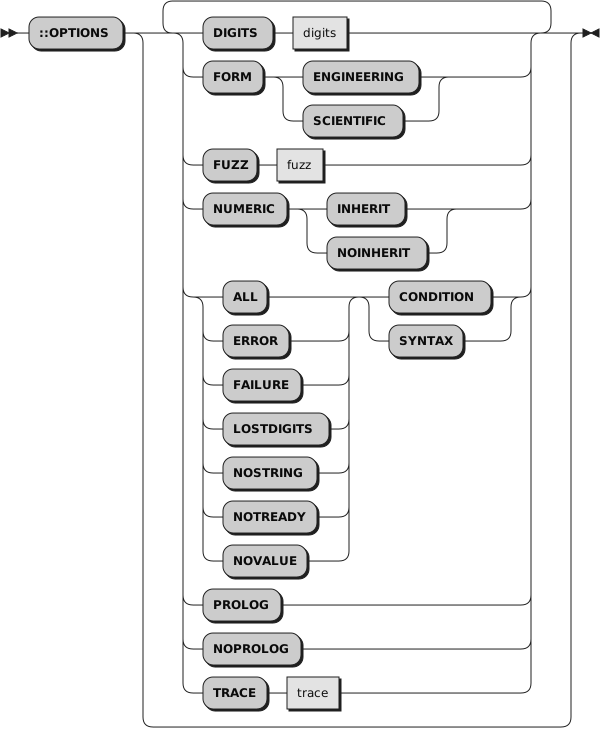
::OPTIONS DIGITS 20DIGITS
|
controls the precision to which arithmetic operations and
built-in functions are evaluated.
The value digits must be a symbol or string
that is a valid positive whole number value and must be larger than the
current FUZZ ::OPTIONS setting.
The package value can be retrieved using the Package class
digits method
or
options
method, which in addition allows for setting the package value as well.
There is no limit to the value for DIGITS
(except the amount of storage available), but high precisions are likely to
require a great amount of processing time. It is recommended that you use
the default value whenever possible.
|
FORM
|
controls the form of exponential notation
for the result of arithmetic
operations and built-in functions. This can be either
SCIENTIFIC (in which
case only one, nonzero digit appears before the decimal point) or ENGINEERING
(in which case the power of 10 is always a multiple of 3). The default is
SCIENTIFIC. The subkeywords SCIENTIFIC or ENGINEERING must be specified as
symbols.
The package value can be retrieved using the Package class
form method
or
options
method, which in addition allows for setting the package value as well.
|
FUZZ
|
controls how many digits, at full precision, are ignored during
a numeric comparison operation.
The value fuzz must be a symbol or string
that is a valid positive whole number value and must be smaller than the
current DIGIT ::OPTIONS setting.
The package value can be retrieved using the Package class
fuzz method
or
options
method, which in addition allows for setting the package value as well.
NUMERIC FUZZ temporarily
reduces the value of NUMERIC DIGITS by the NUMERIC FUZZ value during every
numeric comparison. The numbers are subtracted under a precision of DIGITS
minus FUZZ digits during the comparison and are then compared with 0.
|
NUMERIC
|
controls whether the numeric settings of the caller should be inherited in routines and
methods of the package. This can be either
INHERIT or NOINHERIT
(default). The subkeywords INHERIT or NOINHERIT must be specified
as symbols.
The package value can be retrieved and changed using the Package class
options method.
|
ALL
|
is a shortcut for all six ::OPTIONS condition
directives
ERROR, FAILURE, LOSTDIGITS,
NOSTRING, NOTREADY, and NOVALUE.
::OPTIONS ALL SYNTAX sets all six conditions
to raise SYNTAX, while ::OPTIONS ALL CONDITION sets all of them to their default state.
The package values can be retrieved and changed using the Package class
options method.
|
ERROR FAILURE LOSTDIGITS NOSTRING NOTREADY NOVALUE
|
controls whether an ERROR, FAILURE, LOSTDIGITS, NOSTRING, NOTREADY, or NOVALUE
condition event raises its associated condition, or raises a SYNTAX condition.
The package values can be retrieved and changed using the Package class
options method.
If ::OPTIONS condition CONDITION is in effect,
which is the default, the condition event
raises its associated condition as usual.
If ::OPTIONS condition SYNTAX is in effect,
a SYNTAX condition is raised instead.
To override an ::OPTIONS
condition SYNTAX package default, you can use
SIGNAL ON
condition,
SIGNAL OFF condition,
SIGNAL ON ANY, or SIGNAL OFF ANY, to raise the associated condition,
or raise no condition at all.
For conditions
ERROR,
FAILURE, and NOTREADY you can also use
CALL ON
condition,
CALL OFF condition,
CALL ON ANY, or CALL OFF ANY, to raise the associated condition,
or raise no condition at all.
|
PROLOG NOPROLOG
|
controls whether prolog code (any code in the source program that comes
before the first directive) is run when another program requires it
through a ::REQUIRES directive.
The package value can be retrieved and changed using the Package class
options method.
If ::OPTIONS PROLOG is in effect, any prolog code is run as usual when
the source program is being required using a :REQUIRES directive.
If ::OPTIONS NOPROLOG is in effect, any prolog code is not
run.
The default is ::OPTIONS PROLOG.
|
TRACE
|
controls the tracing action (that is, how much is displayed to the user) during the processing of
all Rexx code contained in the package. Tracing describes some or all of the clauses in a program,
producing descriptions of clauses as they are processed. TRACE is mainly used for debugging.
The value trace must be one of the
prefix or
alphabetic character (word) options
valid for the TRACE instruction.
The package value can be retrieved using the Package class
trace method.
or
options
method, which in addition allows for setting the package value as well.
|