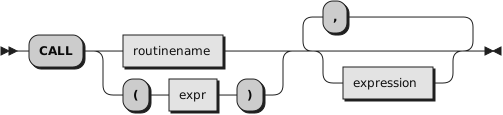
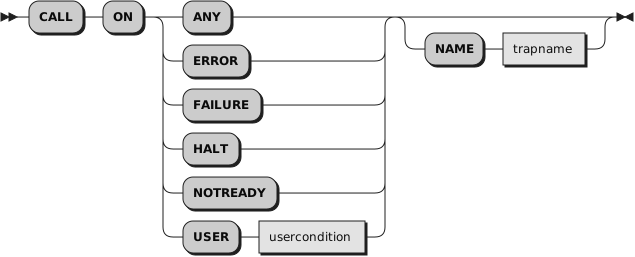
CALL calls a routine (if you specify
routinename or
expr) or controls the trapping
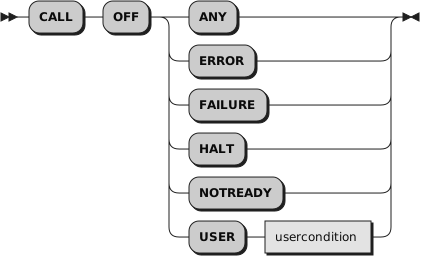
of certain conditions (if you specify ON or OFF).
To control trapping, you specify OFF or ON and the condition you want to
trap. OFF turns off the specified condition trap. ON turns on the specified
condition trap.
The
usercondition is a single
symbol that is taken as a constant.
The
trapname is a symbol or string
taken as a constant.
All information on condition traps is contained in
Chapter 11, Conditions and Condition Traps.
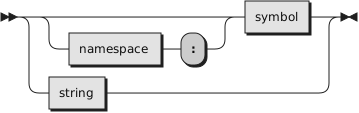
To call a routine, specify
routinename,
which must be a literal string or a symbol that is taken as a constant.
When it is a symbol, it can be optionally preceeded by a
namespace
followed by a colon.
The routine called can be:
- An internal routine
A subroutine that is in the same program as the CALL
instruction or function call that calls it. Internal routines are located
using label instructions.
- A built-in routine
A function that is defined as part of the
Rexx language.
- An external routine
A subroutine that is neither built-in nor a label
within the same same program as the CALL instruction call that invokes it.
See
Section 7.2.1, “Search Order” for details on the different
types of external routines.
If
routinename is a literal string
(that is, specified in quotation marks), the search for internal routines is bypassed,
and only a built-in function or an external routine is called. Note that
built-in function names are in uppercase. Therefore, a literal string call
to a built-in function must also use uppercase characters.
You can also specify (
expr),
any valid expression enclosed in
parentheses. The expression is evaluated before any of the argument expressions,
and the value is the target of the CALL instruction. The language processor
does not translate the expression value into uppercase, so the evaluated name
must exactly match any label name or built-in function name. See
Section 1.12.3, “Labels” for a description of label names.
The called routine can optionally return a result. In this case, the CALL
instruction is functionally identical with the clause:
You can use any number of
expressions,
separated by
commas. The expressions are evaluated from left to right and form the arguments
during execution of the routine. Any ARG, PARSE ARG, or USE ARG instruction
or ARG built-in function in the called routine accesses these objects while
the called routine is running. You can omit expressions, if appropriate, by
including extra commas.
The CALL then branches to the routine called
routinename, using exactly
the same mechanism as function calls. See
Chapter 7, Functions. The search
order is as follows:
- Internal routines
These are sequences of instructions inside the same program,
starting at the label that matches
routinename in the CALL instruction. If you specify
the routine name in quotation marks, then an internal routine is not considered
for that search order. The RETURN instruction completes the execution of an
internal routine.
- Built-in routines
These are routines built into the language processor for
providing various functions. They always return an object that is the result
of the routine. See
Section 7.4, “Built-in Functions”.
You can call any built-in function
as a subroutine. Any result is stored in RESULT. Simply specify
CALL, the function name (with
no parenthesis)
and any arguments, for example:
call length "string"   /* Same as length("string") */
say result             /* Produces: 6              */
- External routines
Users can write or use routines that are external to the
language processor and the calling program. You can code an external routine
in Rexx or in any language that supports the system-dependent interfaces.
If the CALL instruction calls an external routine written in Rexx as a
subroutine, you can retrieve any argument strings with the ARG, PARSE ARG, or
USE ARG instructions or the ARG built-in function.
During execution of an internal routine, all variables previously known
are generally accessible. However, the PROCEDURE instruction can set up a
local variables environment to protect the subroutine and caller from each
other. The EXPOSE option on the PROCEDURE instruction can expose selected
variables to a routine.
Calling an external program or routine defined with a ::ROUTINE directive
is similar to calling an internal
routine. The external routine, however, is an implicit PROCEDURE in that all
the caller's variables are always hidden. The status of internal values, for
example NUMERIC settings, start with their defaults (rather than inheriting
those of the caller). In addition, you can use EXIT to return from the routine.
When
control reaches an internal routine,
the line number of the CALL instruction is available in the variable
SIGL (in the caller's variable environment). This can be used as a debug aid
because it is possible to find out how control reached a routine. Note that
if the internal routine uses the PROCEDURE instruction, it needs to EXPOSE
SIGL to get access to the line number of the CALL.
After the subroutine processed
the RETURN instruction, control returns to the clause following the original
CALL. If the RETURN instruction specified an expression, the variable RESULT
is set to the value of that expression. Otherwise, the variable RESULT is
dropped (becomes uninitialized).
An internal routine can include calls to other internal routines,
as well as recursive calls to itself.
Example 2.6. Instructions — CALL
/* Recursive subroutine execution... */
arg z
call factorial z
say z"! =" result
exit
factorial: procedure     /* Calculate factorial by  */
  arg n                  /*  recursive invocation.  */
  if n=0 then return 1
  call factorial n-1
  return  result * n
During
internal subroutine (and function) execution, all important pieces of
information are automatically saved and then restored upon return from the
routine. These are:
The status of loops and other
structures: Executing
a SIGNAL within a subroutine is safe because loops and other structures
that were active when the subroutine was called are not ended. However, those
currently active within the subroutine are ended.
Trace action: After a
subroutine is debugged, you
can insert a TRACE Off at the beginning of it without affecting the tracing
of the caller. If you want to debug a subroutine, you can insert a TRACE Results
at the start and tracing is automatically restored to the conditions at entry
(for example, Off) upon return. Similarly,
?
(interactive debug) is saved across routines.
NUMERIC settings:
The DIGITS, FUZZ, and FORM of arithmetic operations are saved and then restored
on return. A subroutine can, therefore, set the precision, for example, that
it needs to use without affecting the caller.
ADDRESS settings:
The current and previous destinations for commands,
including any associated I/O redirection configurations,
are saved and then restored on return.
Condition traps: CALL ON and SIGNAL ON are
saved and then restored on return. This means that CALL ON, CALL OFF, SIGNAL ON,
and SIGNAL OFF can be used in a subroutine without affecting the conditions
the caller set up.
Condition information: This
information describes
the state and origin of the current trapped condition.
The
CONDITION built-in function
returns this information.
Elapsed-time clocks:
A subroutine inherits the elapsed-time
clock (see
Section 7.4.66, “TIME”) from its caller, but because the
time clock is saved across routine calls, a subroutine or internal function
can independently restart and use the clock without affecting its caller.
For the same reason, a clock started within an internal routine is not
available to the caller.