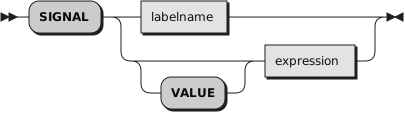
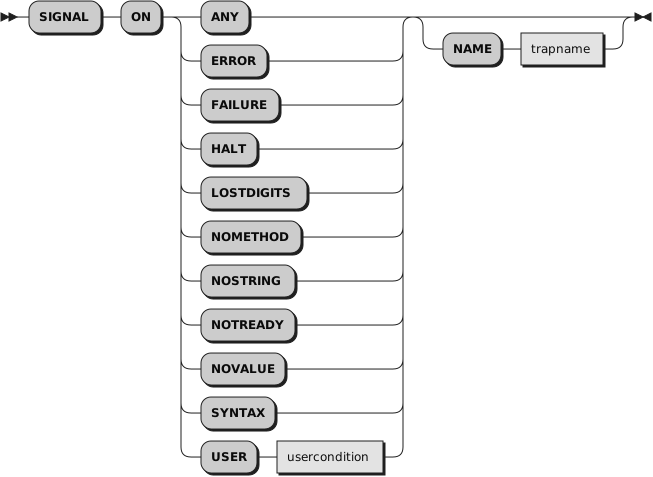
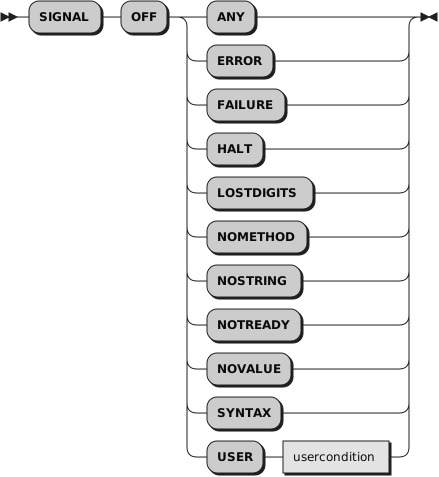
SIGNAL causes an unusual change in the flow of control (if you specify
labelname or VALUE
expression), or controls the trapping of
certain conditions (if you specify ON or OFF).
To change the flow of control, a label
name is derived from
labelname or taken
from the character string result of evaluating the
expression after VALUE. The
labelname you specify must be a literal
string or symbol that is taken as a constant. If you specify a symbol for
labelname, the search looks for a label
with uppercase characters. If you specify a literal string, the search uses
the literal string directly. You can locate label names with lowercase letters
only if you specify the label as a literal string with the same case. Similarly,
for SIGNAL VALUE, the lettercase of
labelname must match exactly.
You can omit the subkeyword VALUE if
expression does not begin with
a symbol or literal string, that is, if it starts with a special character,
such as an operator character or parenthesis. All active pending DO, IF, SELECT,
and INTERPRET instructions in the current routine are then ended and cannot
be resumed. Control is then passed to the first label in the program that
matches the given name, as though the search had started at the beginning
of the program.
The
labelname
and
usercondition are single symbols, which
are taken as constants. The
trapname is a
string or symbol taken as a constant.
Example 2.38. Instructions — SIGNAL
Signal fred;  /* Transfer control to label FRED below */
....
....
Fred: say "Hi!"
When control
reaches the specified label, the line number of the SIGNAL instruction is
assigned to the special variable
SIGL. This can aid debugging because you
can use SIGL to determine the source of a transfer of control to a label.