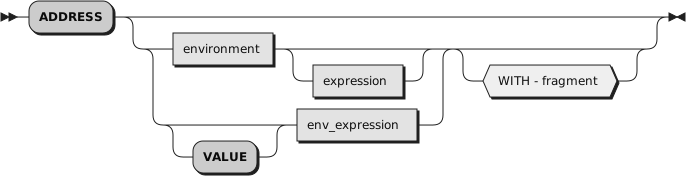
ADDRESS permanently changes the destination or I/O redirection of
commands, or temporarily changes the destination and sends a command with
optional I/O redirection of standard input, standard output, and standard
error from or to Rexx objects.
To send a single command to a specified environment, code an
environment,
a literal string or a single symbol, which is taken to be a constant,
followed by an
expression.
The environment name is the name of an external procedure
or process that can process commands. The
expression is evaluated
to produce a character string value, and this string is routed to the
environment
to be processed as a command.
After execution
of the command,
environment
is set back to its original state, thus
temporarily changing the destination for a single command. The special variable
RC and the environment symbol .RS are set and errors and failures in commands
processed in this way are trapped or traced.
The following evironments are available in ooRexx:
sh (Unix-like systems only)This is the default environment on Unix-like systems.
It uses
sh as a shell program to execute the command.
All shell features such as redirection or piping can be used.
bsh, bash, csh,
ksh, tcsh, zsh
(Unix-like systems only)These environments use alternate Unix-like system shells
bsh,
bash,
csh,
ksh,
tcsh, or
zsh
to execute the command.
If the appropriate shell is not installed on the system, executing a
command in any of these environments will raise a failure.
cmd (Windows only)This is the default environment on Windows systems.
It uses
cmd.exe as a command interpreter to
execute the command.
Command interpreter features such as internal commands, redirection or
piping can be used.
command, system, ""These environment names are synonyms for the default environments
sh on Unix-like systems and
cmd on Windows.
pathThis environment executes commands directly,
without using an intermediate command interpreter or shell program.
It searches the environment variable PATH to locate the command to execute.
No shell features such as internal commands, redirection, piping or
environment variable substitution are available.
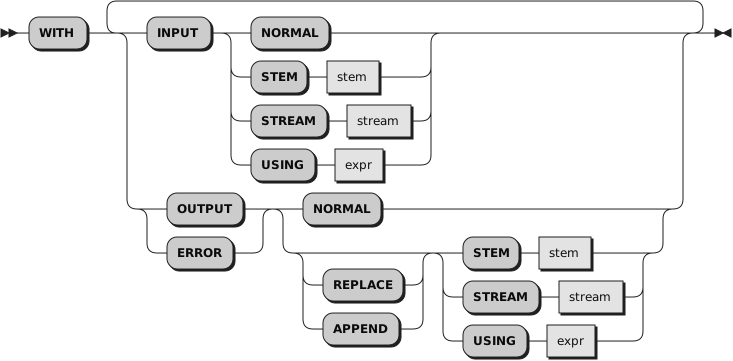
The
WITH subkeyword sets a command's I/O redirection.
STDIN input can be redirected from a Rexx object to the command, and
STDOUT and STDERR output from the command can be redirected to a Rexx object.
I/O redirection is permanent when specified on an ADDRESS instruction
without a command, and temporary if a command is specified.
Any permanent I/O redirection is associated with the environment name and
will be saved and restored across function and subroutine calls.
For permanent I/O redirections, any redirection objects or expressions are
not evaluated at the time the ADDRESS instruction is processed.
Each time a command is sent to this environment, these objects and
expressions will be evaluated in the then current variable context.
WITH INPUTredirects data from a stem, a stream, or other Rexx
object to the command's input.
If option
NORMAL is specified, the command's
standard input will be used.
If option
STEM is specified,
stem must be a stem variable, where
stem.0 specifies
the number of input lines, and each
stem.i
(with
i from
1
through
stem.0)
specifies an input line.
If option
STREAM is specified,
stream must be a literal string,
a constant symbol, an environment symbol, or an expression enclosed in parentheses that
evaluates to a string which is used as the stream name.
Input lines for the command are read from
stream using the
lineIn method.
If option
USING is specified,
expr must be a literal string,
a constant symbol, an environment symbol, or an expression enclosed in parentheses that
evaluates to a String, a Stem object, an InputStream, a Monitor or a File object,
or an Array object or any other object that supports a
makeArray method (e. g. a RexxQueue object).
If the resulting object is a String, the command will receive a single input line,
if it is a Stem, an InputStream, a Monitor, or a File object, input is redirected
as described for options
STEM and
STREAM.
If the resulting object is an Array object, all Array items are converted to
strings and are sent to the command as input lines.
Empty array items are ignored.
WITH OUTPUT and WITH ERRORredirect a command's standard output or error output to
a stem, a stream, or other Rexx objects.
If option
NORMAL is specified,
the command's default output destination, or default error destination is used.
If option
STEM is specified,
stem must be a stem variable.
If
REPLACE is specified together with
STEM,
the number of output lines is stored in
stem.0 and individual
lines are stored as
stem.i,
with
i running from
1
through
stem.0.
REPLACE is the default.
If
APPEND is specified with
STEM,
individual lines are stored as
stem.i,
with
i starting at the value of the
existing
stem.0
plus
1.
The initial
stem.0
value is then incremented by the total number of output lines for the
command.
If option
STREAM is specified,
stream must be a literal string,
a constant symbol, an environment symbol, or an expression enclosed in parentheses that
evaluates to a string which is used as the stream name.
Output or error lines from the command are written to the stream with the
lineOut method.
If
REPLACE is specified with
STREAM,
stream is truncated to zero length
before any output lines are written.
REPLACE is the default.
If
APPEND is specified with
STREAM,
output lines are appended to
stream.
If option
USING is specified,
expr must be
a constant symbol, an environment symbol, or an expression enclosed in parentheses that
evaluates to a Stem object, an OutputStream, a Monitor, a RexxQueue,
a File object, or an OrderedCollection object.
If the resulting object is a Stem or a File object, output lines are
written as described for options
STEM and
STREAM.
If it is an OutputStream or a Monitor object, output lines are always
appended to the stream; neither
REPLACE nor
APPEND can be specified in this case.
If the object is a RexxQueue, method
queue
is used for each output line.
Neither
REPLACE nor
APPEND can be
specified for a RexxQueue.
If the resulting object is an OrderedCollection object and
REPLACE is specified, the collection is emptied using
method
empty before any output lines are added
to the collection using method
append.
REPLACE is the default.
If
APPEND is specified, output lines are appended to
the existing collection using method
append.
Specifying one of the
INPUT,
OUTPUT, or
ERROR subkeywords more than once
is an error.
If an input source object and an output or error target object
is the same, Rexx uses appropriate read and write buffering to make sure results
are correct.
If the standard output target and the standard error target object
is the same object, Rexx will send interleaved output and error lines to the target.
Example 2.1. Instructions — ADDRESS
ADDRESS "CMD" 'dir "\Program Files"'            -- Windows
ADDRESS "sh" "ls /usr/bin"                      -- Unix-like system

address "" "cat" with input using "single line" -- Unix-like system: "single line"
address "" "ver" with output stem v.; say v.2   -- "Microsoft Windows ..."

address "" with input using (a) output using (a)
a = 4, 2, 3, 1
"sort"
say a~toString(, " ")                           -- 1 2 3 4
If you specify only
environment, a
lasting change of destination occurs: all commands (see
Section 1.16.2, “Commands”) that follow are routed to
the specified command environment, until the next ADDRESS instruction is
processed. The previously selected environment is saved.
Assume that the environment for a Windows text editor is
registered by the name
EDIT:
Example 2.2. Instructions — ADDRESS environments
address CMD
"DIR C:\AUTOEXEC.BAT"
if rc=0 then "COPY C:\AUTOEXEC.BAT C:\*.TMP"
address EDIT
Subsequent commands are passed to the editor until the next ADDRESS
instruction.
Similarly, you can use the VALUE form to make a lasting change to the
environment. Here
env_expression, which can be a
variable name, is evaluated, and
the resulting character string value forms the name of the environment. You
can omit the subkeyword VALUE if
env_expression
does not begin with
a literal string or symbol, that is, if it starts with a special character
such as an operator character or parenthesis.
Example 2.3. Instructions — ADDRESS environments
ADDRESS ("ENVIR"||number) /* Same as ADDRESS VALUE "ENVIR"||number */
With no arguments, commands are routed back to the environment that was
selected before the previous change of the environment, and the current environment
name is saved. After changing the environment, repeated execution of ADDRESS
alone, therefore, switches the command destination between two environments.
Using a null string for the environment name ("") is the same as using
the default environment.
The two environment names are automatically saved across internal and external
subroutine and function calls.
See the
CALL instruction for more details.
The address setting is the currently
selected environment name. You can retrieve the current address setting by
using the
ADDRESS built-in function.
The
Open Object Rexx: Application Programming Interfaces
describes the creation of alternative subcommand environments.