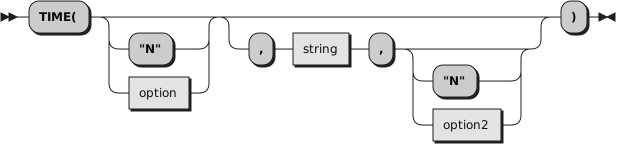
Returns the local time in the 24-hour clock format hh:mm:ss
(hours, minutes, and seconds) by default, for example,
04:41:37.
You can use the following
options
to obtain alternative formats, or to gain access to the elapsed-time clock.
(Only the capitalized letter
is needed; all characters following it are ignored.)
Civilreturns the time in Civil format hh:mmxx. The hours can take
the values
1 through
12, and the minutes the values
00 through
59.
The minutes are followed immediately by the letters
am or
pm.
This distinguishes times in the morning (12 midnight through 11:59
a.m.--appearing as
12:00am through
11:59am) from noon and afternoon (12 noon
through 11:59 p.m.--appearing as
12:00pm
through
11:59pm). The hour has no leading
zero. The minute field shows the current minute (rather than the nearest
minute) for consistency with other TIME results.
Elapsedreturns sssssssss.uuuuuu, the number of seconds and microseconds
since the elapsed-time clock (described later) was started or reset. The returned
number has no leading zeros or whitespace, and the setting of NUMERIC DIGITS
does not affect it.
The language processor calculates elapsed time by subtracting the time at
which the elapsed-time clock was started or reset from the current time. It
is possible to change the system time clock while the system is running.
This means that the calculated elapsed time value might not be a true elapsed
time. If the time is changed so that the system time is earlier than when
the Rexx elapsed-time clock was started (so that the elapsed time would appear
negative), the language processor raises an error and disables the elapsed-time
clock. To restart the elapsed-time clock, trap the error through SIGNAL ON
SYNTAX.
The clock can also be changed by programs on the system. Many
LAN-attached programs synchronize the system time clock with the system time
clock of the server during startup. This causes the Rexx elapsed time function
to be unreliable during LAN initialization.
Full
returns the number of microseconds
since 00:00:00.000000 on 1 January 0001, in the format:
dddddddddddddddddd (no leading zeros or
whitespace).
The base date of 1 January 0001 is determined
by extending the current Gregorian calendar backward (365 days each year,
with an extra day every year that is divisible by 4 except century years that
are not divisible by 400). It does not take into account any errors in the calendar
system that created the Gregorian calendar originally.
The value returned by Time('F') can be used to calculate the interval between
any two times. Note, however, that values returned generally contain more digits
than the default NUMERIC DIGITS setting. The NUMERIC DIGITS setting should be increased
to a minimum value of 18 when performing timestamp arithmetic.
Hours
returns up to two characters giving the number of hours
since midnight in the format hh (no leading zeros or whitespace, except for a
result of
0).
Longreturns time in the format hh:mm:ss.uuuuuu (where uuuuuu are
microseconds).
Minutes
returns up to four characters giving the number of minutes
since midnight in the format mmmm (no leading zeros or whitespace, except for a
result of
0).
Normalreturns the time in the default format hh:mm:ss. The hours
can have the values
00 through
23, and minutes and seconds,
00 through
59.
There are always two digits. Any fractions
of seconds are ignored (times are never rounded). This is the default.
Offsetreturns the offset of the local time from UTC in microseconds.
The offset value will be negative for timezones west of the Prime Meridian
and positive for timezones east of Prime Meridian. The local time('F') value
can be converted to UTC by subtracting the time('O') value.
Resetreturns sssssssss.uuuuuu, the number of seconds and microseconds
since the elapsed-time clock (described later) was started or reset and also
resets the elapsed-time clock to zero. The returned number has no leading
zeros or whitespace, and the setting of NUMERIC DIGITS does not affect it.
See the Elapsed option for more information on resetting the system
time clock.
Seconds
returns up to five characters giving the number of seconds
since midnight in the format sssss (no leading zeros or whitespace, except for a
result of
0).
Ticks
returns the number of seconds
since 00:00:00.000000 on 1 January 1970, in the format:
dddddddddddd (no leading zeros or
whitespace).
The base date of 1 January 1970 is determined
by extending the current Gregorian calendar backward (365 days each year,
with an extra day every year that is divisible by 4 except century years that
are not divisible by 400). It does not take into account any errors in the calendar
system that created the Gregorian calendar originally.
The value returned by Time('T') can be used to calculate the interval between
any two times. Note, however, that values returned generally contain more digits
than the default NUMERIC DIGITS setting. The NUMERIC DIGITS setting should be increased
to a minimum value of 12 when performing timestamp arithmetic.
Time('T') will return a negative number for dates prior to 1 January 1970.
Here are some examples, assuming that the time is 4:54 p.m.:
Example 7.87. Builtin function TIME
TIME()       -->   "16:54:22"
TIME("C")    -->   "4:54pm"
TIME("H")    -->   "16"
TIME("L")    -->   "16:54:22.120000"   /* Perhaps */
TIME("M")    -->   "1014"           /* 54 + 60*16 */
TIME("N")    -->   "16:54:22"
TIME("S")    -->   "60862"  /* 22 + 60*(54+60*16) */
You can use the TIME function to measure real (elapsed) time intervals.
On the first call in a program to
TIME("E")
or
TIME("R"), the elapsed-time clock is started,
and either call returns
0. From
then on, calls to
TIME("E") and
TIME("R") return the
elapsed time since that first call or since the last call to
TIME("R").
The clock is saved across internal routine calls, which means that an internal
routine inherits the time clock that its caller started. Any timing the caller
is doing is not affected, even if an internal routine resets the clock. An
example of the elapsed-time clock:
Example 7.88. Builtin function TIME elapsed
time("E")    -->    0          /* The first call */
                  /* pause of one second here */
time("E")    -->    1.020000   /* or thereabouts */
                  /* pause of one second here */
time("R")    -->    2.030000   /* or thereabouts */
                  /* pause of one second here */
time("R")    -->    1.050000   /* or thereabouts */
The elapsed-time clock is synchronized with the other calls
to TIME and DATE, so several calls to the elapsed-time clock in a single clause
always return the same result. For this reason, the interval between two
usual TIME/DATE results can be calculated exactly using the elapsed-time clock.
If you specify
string, TIME returns
the time corresponding to
string in the
format
option. The
string must be supplied
in the format
option2. The default for
option2 is "N".
So you need to specify
option2 only if
string is not in
the Normal format.
option2 must specify the
current time, for example, not "E" or "R". Here are some examples:
Example 7.89. Builtin function TIME formatting
time("C","11:27:21")    -->    11:27am
time("N","11:27am","C") -->    11:27:00
time("N", "63326132161828000", "F")   -->   08:16:01
You can determine the difference between two times; for example:
Example 7.90. Builtin function TIME difference
If TIME("M","5:00pm","C")-TIME("M")<=0
then say "Time to go home"
else say "Keep working"
The TIME returned is the earliest time consistent with
string.
For example, if the result requires components that are not specified in the
source format, then those components of the result are zero. If the source
has components that the result does not need, then those components of the
source are ignored.
When requesting times be converted to Full or Ticks format, a date value
of 1 January 0001 is used for the conversion.
A time stamp for a time and date combination can be created by
combining a value from Date('F') for the time of day.
Example 7.91. Builtin function TIME with F option
numeric digits 18  -- needed to add the timestamps
timestamp = date("f", "20170123", "S") + time("f", "08:14:22", "N")
Implementation maximum:
If the number of seconds in the elapsed time exceeds nine digits
(equivalent to over 31.6 years), an error results.