.false or .true.
Evaluation will stop with the first .false
result and .false will be returned as the
condition result..true, then the condition result is also
.true..true
result and .true will be returned as the
condition result..false,
then the condition result is also .false.
.true,
the instruction following the associated THEN (which can be a complex
instruction such as IF, DO, LOOP, or SELECT) is processed and control is
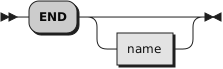
then passed to the END.
If the result is .false, control is
passed to the next WHEN clause.
.true,
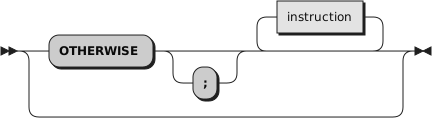
control is passed to the instructions, if any, after OTHERWISE.
In this situation, the absence of an OTHERWISE produces an error, however,
you can omit the instruction list that follows OTHERWISE.
balance=100
check=50
balance = balance - check
Select
  when balance > 0 then
    say "Congratulations! You still have" balance "dollars left."
  when balance = 0 then do
    say "Warning, Balance is now zero!  STOP all spending."
    say "You cut it close this month! Hope you do not have any"
    say "checks left outstanding."
    end
  Otherwise do
    say "You have just overdrawn your account."
    say "Your balance now shows" balance "dollars."
    say "Oops!  Hope the bank does not close your account."
    end
end  /* Select */
select
  when answer~datatype('w'), answer//2 = 0 Then
     say answer "is even"
  when answer~datatype('w'), answer//2 = 1 Then
     say answer "is odd"
  otherwise
     say answer "is not a number"
end
select
  when answer~datatype('w') & answer//2 = 0 Then
     say answer "is even"
  when answer~datatype('w') & answer//2 = 1 Then
     say answer "is odd"
  otherwise
     say answer "is not a number"
end
.false result, so the
"answer//2" term will not be evaluated if the datatype test returns
.false.
select case random(6)
  when 1 then say "bad luck!"
  when 5, 6 then say "great!"
  otherwise say "try again"
end