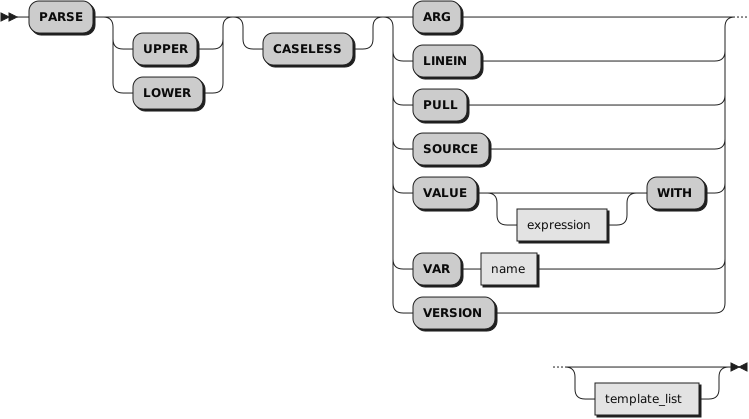
You can specify UPPER and CASELESS or LOWER and CASELESS in
either order.
PARSE assigns data from various sources to one or more variables according
to the rules of parsing. (See
Chapter 9, Parsing.)
If you specify UPPER, the strings to be parsed are translated to uppercase before
parsing. If you specify LOWER, the strings are translated to lowercase. Otherwise
no translation takes place.
If you
specify CASELESS, character string matches during parsing are made independent
of the case. This means a letter in uppercase is equal to the same letter
in lowercase.
The
template_list can be a
single template or list of templates separated by commas. Each
template consists of one or more symbols separated by whitespace, patterns, or
both.
Each template is applied to a single source string. Specifying several
templates is not a syntax error, but only the PARSE ARG variant can supply
more than one non-null source string. See
Section 9.8.1, “Parsing Several Strings” for information
on parsing several source strings.
If you do not specify a template, no variables are set but the data is
prepared for parsing, if necessary. Thus for PARSE PULL, a data string is
removed from the current data queue, for PARSE LINEIN (and PARSE PULL if the
queue is empty), a line is taken from the default input stream, and for PARSE
VALUE,
expression is evaluated.
For PARSE VAR, the specified variable is accessed. If it does not have
a value, the NOVALUE condition is raised, if it is enabled.
The following list describes the data for each variant of the PARSE
instruction.
- PARSE ARG
parses the strings passed to a program, routine, or method as
input arguments.
See the
ARG instruction
for details and examples.
Parsing uses the string values of the argument objects. The
USE ARG instruction provides direct access to argument objects.
You can also retrieve or check the argument objects to a Rexx program, routine, or
method with the
ARG built-in function.
- PARSE LINEIN
parses the next line of the default input stream.
(See
Chapter 14, Input and Output Streams for a discussion
of Rexx input and output.) PARSE LINEIN
is a shorter form of the following instruction:
If no line is available, program execution usually pauses
until a line is complete. Use PARSE LINEIN only when direct access to the
character input stream is necessary. Use the PULL or PARSE PULL instructions
for the usual line-by-line dialog with the user to maintain generality.
PARSE LINEIN will not pull lines from the external data queue.
To check if any lines are available in the default input stream, use the
LINES built-in function.
- PARSE PULL
parses the next string of the external data queue. If the
external data
queue is empty, PARSE PULL reads a line of the default input stream (the user's
terminal), and the program pauses, if necessary, until a line is complete.
You can add data to the head or tail of the queue by using the
PUSH and
QUEUE
instructions, respectively. You can find the number of lines currently in
the queue with the
QUEUED built-in function.
The queue remains active as long as the language processor is active. Other
programs in the system can alter the queue and use it to communicate with
programs written in Rexx.
See also the
PULL instruction.
PULL and PARSE PULL read the current data queue. If the queue is
empty, they read the default input stream, .INPUT (typically, the keyboard).
- PARSE SOURCE
parses data describing the source of the program,
routine or method running.
The first two tokens of source string are the operating system name,
followed by either
COMMAND,
FUNCTION,
SUBROUTINE,
METHOD, or
REQUIRES, depending on
whether the program was called as a host command, or from a function call in
an expression, or using the CALL instruction, or as a method of an object,
or from a ::REQUIRES directive to run the prolog code.
These two tokens are followed by the path specification of the program,
or the name given to a Package, Routine or Method instance, or the string
INSTORE when run via
rexx -e.
The string might look like one of the following:
WindowsNT COMMAND C:\Program Files\ooRexx\rexxtry.rex
LINUX COMMAND /usr/local/bin/rexxtry.rex
- PARSE VALUE
parses the data, a character string, that is the result of
evaluating
expression.
If you specify no
expression, the null string is
used. Note that WITH is a subkeyword in this context and cannot be used as
a symbol within
expression,
except when within a bracketed subexpression.
Thus, for example:
PARSE VALUE time() WITH hours ":" mins ":" secs
gets the current time and splits it into its constituent parts.
- PARSE VAR name
parses the character string value of the variable
name. The
name must be a symbol
that is valid as a variable name, which means it
cannot start with a period or a digit. Note that the variable
name is
not changed unless it appears in the template, so that, for example:
PARSE VAR string word1 string
removes the first word from
string,
puts it in the variable
word1,
and assigns the remainder back to
string.
PARSE UPPER VAR string word1 string
also translates the data from
string
to uppercase before it is parsed.
- PARSE VERSION
parses information describing the language level and the date of the language processor. This information consists of
five blank-delimited words:
The string
REXX-ooRexx_5.0.0(MT)_64-bit,
if using the ooRexx interpreter at version 5, release 0, modification 0, and
compiled for 64-bit addressing mode.
The language level description, for example
6.05 for ooRexx 5.0, or
6.04 for ooRexx 4.2.
Three tokens that describe the language processor release date in the same format as the default for the
DATE built-in function,
for example,
"1 Sep 2016".