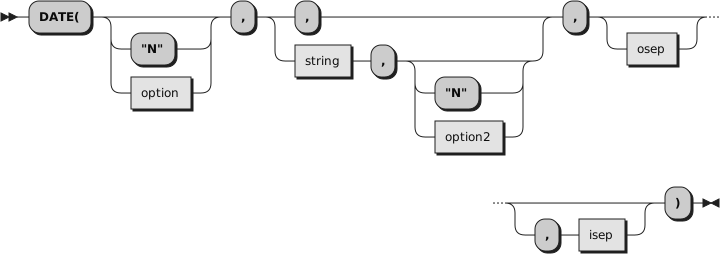
Returns, by default, the local date in the format:
dd mon yyyy (day
month year—for example,
14 May 2017),
with no leading zero or blank on the day. The first three characters of the
English name of the month are used.
You can use the following
options to obtain specific formats.
(Only the capitalized letter is needed; all characters following it are ignored.)
Base
returns the number of complete days (that is, not including the
current day) since and including the base date, 1 January 0001, in the format:
dddddd (no leading zeros or whitespace). The
expression
DATE("B")//7 returns a number in the
range
0-
6 that
corresponds to the current day of the week, where
0 is Monday and
6 is Sunday.
The base date of 1 January 0001 is determined
by extending the current Gregorian calendar backward (365 days each year,
with an extra day every year that is divisible by 4 except century years that
are not divisible by 400). It does not take into account any errors in the calendar
system that created the Gregorian calendar originally.
Days
returns the number of days, including the current day, that have passed
this year in the format
ddd
(no leading zeros or whitespace).
European
returns the date in the format dd/mm/yy.
Full
returns the number of microseconds
since 00:00:00.000000 on 1 January 0001, in the format:
dddddddddddddddddd (no leading zeros or
whitespace).
The base date of 1 January 0001 is determined
by extending the current Gregorian calendar backward (365 days each year,
with an extra day every year that is divisible by 4 except century years that
are not divisible by 400). It does not take into account any errors in the calendar
system that created the Gregorian calendar originally.
The value returned by Date('F') can be used to calculate the interval between
any two dates. Note, however, that values returned generally contain more digits
than the default NUMERIC DIGITS setting. The NUMERIC DIGITS setting should be increased
to a minimum value of 18 when performing timestamp arithmetic.
ISO
Returns the date according to the format specified by ISO 8601.
The format is
yyyy-mm-dd with leading zeroes
if required.
Language
returns the date in an implementation- and language-dependent, or local,
date format. The format is
dd month yyyy.
The name of the month is according to the national language installed on the
system. If no local date format is available, the default format is returned.
This
format is intended to be used as a whole; Rexx programs must not make any
assumptions about the form or content of the returned string.
Month
returns the full English name of the current month, for example,
August.
Normal
returns the date in the format
dd mon yyyy. This is the default.
Ordered
returns the date in the format
yy/mm/dd (suitable for sorting,
for example).
Standard
returns the date in the format
yyyymmdd (suitable for sorting,
for example).
Ticks
returns the number of seconds
since 00:00:00.000000 on 1 January 1970, in the format:
dddddddddddd (no leading zeros or
whitespace).
The value returned by Date('T') can be used to calculate the interval between
any two dates. Note, however, that values returned generally contain more digits
than the default NUMERIC DIGITS setting. The NUMERIC DIGITS setting should be increased
to a minimum value of 12 when performing timestamp arithmetic.
Date('T') will return a negative number for dates prior to 1 January 1970.
Usa
returns the date in the format
mm/dd/yy.
Weekday
returns the English name for the day of the week, in mixed case, for
example,
Tuesday.
Here are some examples, assuming today is 24 Nov 2016:
Example 7.31. Builtin function DATE
DATE()       -- 24 Nov 2016
DATE("B")    -- 736291
DATE("D")    -- 329
DATE("E")    -- 24/11/16
DATE("F")    -- 63615600688459000
DATE("I")    -- 2016-11-24
DATE("L")    -- 24 November 2016
DATE("M")    -- November
DATE("N")    -- 24 Nov 2016
DATE("O")    -- 16/11/24
DATE("S")    -- 20161124
DATE("T")    -- 1480003888
DATE("U")    -- 11/24/16
DATE("W")    -- Thursday
The first call to DATE or TIME in one clause causes a time
stamp to be made that is then used for all calls to
these functions in that clause. Therefore, several calls to any of the DATE
or TIME functions, or both, in a single expression or clause are consistent
with each other.
If you specify
string, DATE returns
the date corresponding to
string
in the format
option. The
string must be supplied
in the format
option2. The
option2 format must specify day,
month, and year (that is, not "D", "L", "M", or "W").
The default for
option2 is "N", so you need
to specify
option2 if
string is not in the Normal
format. Here are some examples:
Example 7.32. Builtin function DATE set
DATE("O", "13 Feb 1923")            -->    "23/02/13"
DATE("O", "06/01/50", "U")          -->    "50/06/01"
DATE("N", "63630372300000000", "f") -->    "14 May 2017"
If you specify an output separator character
osep, the
days, month, and year returned are separated by this character. Any nonalphanumeric
character or an empty string can be used. A separator character is only valid
for the formats "E", "I", "N", "O", "S", and "U".
Here are some examples:
Example 7.33. Builtin function DATE set
DATE("S", "13 Feb 2017", "N", "-")  -->    "2017-02-13"
DATE("N", "13 Feb 2017", "N", "")   -->    "13Feb2017"
DATE("N", "13 Feb 2017", "N", "-")  -->    "13-Feb-2017"
DATE("O", "06/01/50", "U","")       -->    "500601"
DATE("E", "02/13/17", "U",".")      -->    "13.02.17"
DATE("N", , ,"_")                   -->    "14_May_2017"  (today)
In this way, formats can be created that are derived from their
respective default format, which is the format associated with
option using its default separator character.
The default separator character for each of these formats is:
If you specify a
string
containing a separator that is different from the default separator character of
option2, you must also specify
isep to indicate which separator character
is valid for
string. Basically,
any date format that can be generated with
any valid separator character can be used as input date
string as
long as its format has the generalized form specified by
option2 and
its separator character matches the character specified by
isep.
Example 7.34. Builtin function DATE set
DATE("S", "2017-11-13", "S", "", "-")  -->    "20171113"
DATE("S", "13-Nov-2017", "N", "", "-") -->    "20171113"
DATE("O", "06*01*50","U", "", "*")     -->    "500601"
DATE("U", "13.Feb.2017", "N", , ".")   -->    "02/13/17"
You can determine the number of days between two dates; for example:
Example 7.35. Builtin function DATE days
say date("B", "12/25/17", "USA") - date("B") "shopping days till Christmas!"
If
string does not include the
century but
option defines that the
century be returned as part of the date, the century
is determined depending on whether the year to be returned is within the past
50 years or the next 49 years. Assume, for example, that you specify 10/15/61
for
string and today's date is 10/27/2016. In this case, 1961
would be 55 years ago and 2061 would be 45 years in the future. So, 10/15/2061
would be the returned date.
This rule is suitable for dates
that are close to today's date. However, when working with birth dates,
it is recommended that you explicitly provide the century.
When requesting dates to be converted to Full format or Ticks format, a time value
of "00:00:00.000000" is used for the conversion.
A time stamp for a time and date combination can be created by
combining a value from Time() for the time of day.
Example 7.36. Builtin function DATE timestamp
numeric digits 18  -- needed to add the timestamps
timestamp = date("f", "20170123", "S") + time("f", "08:14:22", "N")