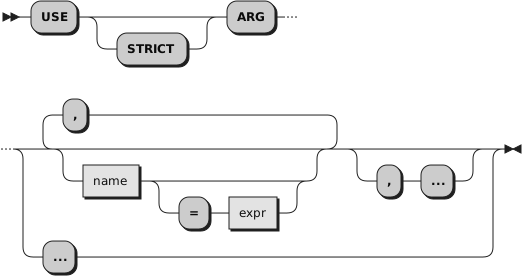
2.30.1. USE ARG, USE STRICT ARG
Each
name must be a valid variable
name, a variable reference term, or an assignment message term.
The
names are
assigned from left to right. For each
name
you specify, the language processor assigns it a corresponding argument from
the program, routine, function, or method call. If there is no corresponding
argument,
name is assigned the value
of
expr.
If
= expr is not specified for
the given argument, the variable
name is dropped.
If the assignment target is a variable reference term, the corresponding argument
must never be omitted.
If the assignment target is a message term, no action is taken for omitted arguments.
A USE ARG instruction can be processed repeatedly and it always accesses
the same current argument data.
If
= expr is specified
for an argument, the expression is evaluated to provide a default value for an
argument when the corresponding argument does not exist.
The default
expr must be a literal string,
a constant symbol, an environment symbol, or an expression enclosed in parentheses.
No default value is allowed for variable reference terms.
The
STRICT option imposes additional constraints on argument processing.
The number of arguments must match the number of
names, otherwise an error is raised. An argument
is considered optional if
expr has been
specified for the argument.
An ellipsis (
...) can be specified after the last
variable in a USE STRICT ARG statement to indicate that more arguments may follow.
This allows defining a minimum number of arguments that must be supplied or for which
there are default values defined, which may optionally be followed by any additional
arguments.
Example 2.40. Instructions — USE
/* USE Example                       */
/* FRED("Ogof X",1,5) calls function */
Fred: use arg string, num1, num2

/* Now: STRING contains "Ogof X"     */
/*      NUM1 contains "1"            */
/*      NUM2 contains "5"            */
/* Another example, shows how to pass non-string arguments with USE ARG */
/* Pass a stem and an array to a routine to modify one element of each  */
stem.1 = "Value"
array = .array~of("Item")
say "Before subroutine:" stem.1 array[1]  /* Shows "Value Item"         */
Call Change_First stem. , array
say "After subroutine:" stem.1 array[1]   /* Shows "NewValue NewItem"   */
Exit

Change_First: Procedure
  Use Arg substem., subarray
  substem.1 = "NewValue"
  subarray[1] = "NewItem"
  Return
/* USE STRICT Example                */
/* FRED("Ogof X",1) calls function  */
Fred: use strict arg string, num1, num2=4

/* Now: STRING contains "Ogof X"     */
/*      NUM1 contains "1"            */
/*      NUM2 contains "4"            */
In the above example, a call to the function FRED may have either 2 or 3 arguments. The
STRICT keyword on the USE instruction will raise a syntax error for any other combination of
arguments.
Example 2.41. Instructions — USE
call test "one"
call test "one", "two"
call test "one", "two", "three"
call test "one", , "three", "four", "five"
exit

test: procedure /* a minimum of one argument must be supplied */
  use strict arg v1, v2="zwei", ...
  say "There are ["arg()"] argument(s); v1,v2=["v1","v2"]"
  do i=3 to arg()
    say " arg #" i"=["arg(i)"]"
  end
  say "--"
  return
Output:
There are [1] argument(s); v1,v2=[one,zwei]
--
There are [2] argument(s); v1,v2=[one,two]
--
There are [3] argument(s); v1,v2=[one,two]
 arg # 3=[three]
--
There are [5] argument(s); v1,v2=[one,zwei]
 arg # 3=[three]
 arg # 4=[four]
 arg # 5=[five]
--
The assignment targets may be any term that can be on the left side of
an assignment statement.
Example 2.42. Instructions — USE
::method myMethod
expose myArray myDirectory
use arg myArray[1], myDirectory~name
would be equivalent to
myArray[1] = arg(1)
myDirectory~name = arg(2)
You can retrieve or check the arguments by using the
ARG built-in function.
The ARG and PARSE ARG instructions are alternative
ways of retrieving arguments. ARG and PARSE ARG access the string values of
arguments. USE ARG performs a direct, one-to-one assignment of arguments.
This is preferable when you need direct access to an argument,
without translation or parsing. USE ARG also allows access to both string
and non-string argument objects; ARG and PARSE ARG convert the arguments to string values
before parsing.