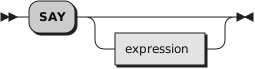
SAY writes a line to the default output stream, which displays it to the
user. However, the output destination can depend on the implementation. See
Chapter 14, Input and Output Streams for a discussion of
Rexx input and output. The string value of the
expression result is written to the default
character output stream. The resulting string can be of any length. If
you omit expression,
the null string is written.
The SAY instruction is a shorter form of the following instruction:
except that:
SAY does not affect the special variable RESULT.
If you use SAY and omit
expression, a null string is used.
data=100Saydata"divided by 4 =>"data/4/* Displays: "100 divided by 4 => 25" */
Notes:
Data from the SAY instruction is sent to the default output
stream (.OUTPUT). However, the standard rules for redirecting output apply
to the SAY output.
The SAY instruction does not format data; the operating system
and the hardware handle line wrapping. However, formatting is accomplished,
the output data remains a single logical line.