
The Highlighter class
The Highlighter class
Methods
new (Class method)

Creates a new Highlighter object. The program to parse has a source, which is an array of strings, and a name, a string that identifies the program. The third argument, options, is optional.
When the options argument is specified, it must be a stem with a default value of 0, and you have to provide values for the relevant indexes. When the options argument is not specified, a set of default values is provided by the class init method.
Recognized options indexes and default values
All tail values are case-insensitive.
assignment
One of detail, full or
group.
The value of this compound variable determines how assignment
operator sequences will be highlighted. The default value for this
option is group.
When group is specified, a single, generic, highlighting
class will be assigned to every assignment sequence. When
detail is specified, every assigment sequence will get its
own, different, highlighting class (this means, for example, that all
simple assignments, =, will be assigned the same
highlighting class, all += assignments will be assigned a
different class, and so on). When full is specified, both a
generic and a specific class will be assigned.
The same mechanism is used in a number of other tails below.
classprefix
Defines the class prefix used in HTML classes. The default value for
this option is rx-.
compound
One of full, yes, 1 or
true, meaning yes, or variable,
no, 0, or false, meaning
no.
Determines whether, yes or no, full detailed compound variable tail highlighing is desired.
The default value for this option is 1.
constant
One of detail, full or group.
See the description for assignment for
details.
Defines how the highlighing classes are assigned for elements which are "taken constants", i.e., strings or symbols taken as a constant.
The default value for this option is full.
doccomments
One of detailed or block. When
detailed is selected, some of the doc-comments elements,
like the initial summary statement, the main description or the final
block tags, are highlighted separately; when block is
selected, the whole doc-comment is highlighted as a whole, with a single
style.
The default value for this option is detailed.
mode
One of HTML, ANSI or LaTeX.
This value selects the desired mode of highlighting.
The default value for this option is HTML.
numberLines
A boolean determining whether lines should be numbered.
The default value for this option is 0.
operator
One of detail, full or group.
See the description for assignment for
details.
Defines how the highlighing classes are assigned for elements and element sequences which are operators. Please note that is a operator is interrupted by whitespace and/or comments, highlighing is only applied to the characters that constitute the operator.
The default value for this option is group.
prolog
A boolean value. Some drivers, like the LaTeX drivers, may emit an optional prolog containing all the color definitions and some macros which may be needed by the highlighted program. The value of this options controls whether the prolog is printed or not.
The default value for this option is 0.
special
One of detail, full or group.
See the description for assignment for
details.
Defines how the highlighting classes are assigned for elements which are special characters.
The default value for this option is group.
startFrom
The positive integer number assigned to the first line displayed.
This option is ignored When numberlines is
0.
The default value for this option is 1.
string
This options affects string highlighting. When its value is
detail (the default), the opening and closing quotes and
the optional suffix get a distinct highlighting; when it is "whole", the
whole string is highlighted using a single style.
style
A string determining the CSS style used for highlighing. This
implementation searches for a file called
rexx-style.css in the css
subdirectory. Style names can only use uppercase or lowercase ANSI
letters or numbers (i.e., XRange("ALNUM"), plus ".", "-" or "_".
The current distribution includes two CSS style files:
rexx-light.css and rexx-dark.css.
The default value for this option is "dark".
parse
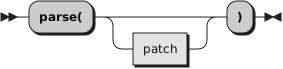
Returns the program, highlighted as per the options specified at object creation time. The optional patch argument specifies a StylePatch that may override certain highlighting classes for the duration of the current highlighing only. The style patch can also be specified as a string, or as an array of strings.