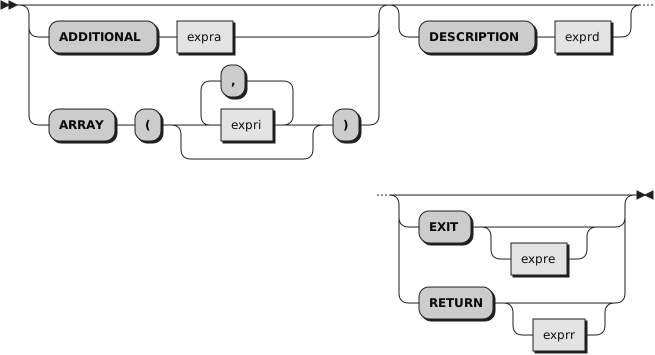
You can specify the options
ADDITIONAL,
ARRAY,
DESCRIPTION,
RETURN, and
EXIT in any order. However, if you specify
EXIT without
expre or
RETURN without
exprr, it must appear last.
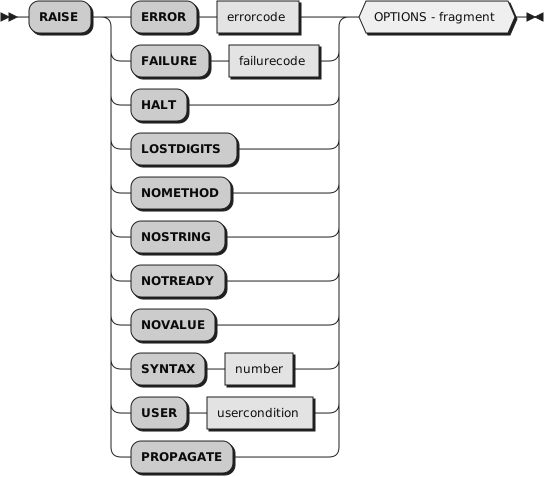
RAISE returns or exits from the currently running routine or method and
raises a condition in the caller (for a routine) or sender (for a method).
See
Chapter 11, Conditions and Condition Traps
for details of the actions taken when conditions
are raised. The RAISE instruction can raise all conditions that can be trapped.
If the ERROR or FAILURE condition is raised, you must supply the
associated return code as
errorcode or
failurecode, respectively. These
can be literal strings, constant symbols, environment symbols, or expressions enclosed in parentheses.
If you specify an expression enclosed in parentheses, a subexpression, the
language processor evaluates the expression to obtain its character string
value.
If the SYNTAX condition is raised, you must supply the associated Rexx
error number as
number. This error
number can be either
a Rexx major error code or a Rexx detailed error code in the form
nn.nnn. The
number can be a literal string, a constant
symbol, or an expression enclosed in parentheses. If you specify an
expression enclosed in parentheses, the language processor evaluates the
expression to obtain its character string value.
If a USER condition is raised, you must supply the associated user
condition name as
usercondition,
which must be a symbol that is taken as a constant.
If you specify the
ADDITIONAL option, the language processor evaluates
expra to produce an object that supplies
additional object information associated with the condition. The
expra can be a literal string,
a constant symbol, an environment symbol, or an expression enclosed in parentheses. The ADDITIONAL entry
of the condition object and the
"A" option of the CONDITION
built-in function return this additional object information. For SYNTAX conditions,
the ADDITIONAL value must evaluate to a single-dimensional Array.
If you specify the
ARRAY option, each
expri is an expression (use
commas to separate the expressions). The language processor evaluates the
expression list to produce an array object that supplies additional object
information associated with the condition. The ADDITIONAL entry of the condition
object and the
"A" option of
the CONDITION built-in function
return this additional object information as an array of values. It is an
error to use both the
ARRAY option and the
ADDITIONAL option on the same RAISE
instruction.
The content of
expra or
expri is used as the contents
of the secondary error message produced for a
condition.
If you specify neither ADDITIONAL nor ARRAY, there is no additional object
information associated with the condition.
If you specify the
DESCRIPTION option, the
exprd can be a literal
string, a constant symbol, an environment symbol, or an expression enclosed in parentheses. If you
specify an expression enclosed in parentheses, the language processor evaluates
the expression to obtain its character string value. This is the description
associated with the condition. The
"D" option of the CONDITION
built-in function and the DESCRIPTION entry of the condition object return
this string.
If you do not specify DESCRIPTION, the language processor uses a null
string as the descriptive string.
If you specify the
RETURN or
EXIT option, the language processor evaluates
the expression
exprr or
expre, respectively, to produce
a result object that is passed back to the caller or sender as if it were
a RETURN or EXIT result. The
expre or
exprr is a literal
string, a constant symbol, an environment symbol, or an expression enclosed in parentheses. If you specify
an expression enclosed in parentheses, the language processor evaluates the
expression to obtain its character string value. If you do not specify
exprr or
expre, no result is passed back to the
caller or sender. In either case, the effect is the same as that of the
RETURN or
EXIT instruction.
The
EXIT option is the default.
Following the return or exit, the appropriate action is taken in the caller
or sender (see
Section 11.1, “Action Taken when a Condition Is Not Trapped”).
If specified, the result value can be obtained from the RESULT entry of the
condition object.
Example 2.31. Instructions — RAISE
raise syntax 40                      /* Raises syntax error 40                */
raise syntax 40.12 array (1, number) /* Raises syntax error 40, subcode 12    */
                                     /* Passing two substitution values       */
raise syntax (errnum)                /* Uses the value of the variable ERRNUM */
                                     /* as the syntax error number            */
raise user badvalue                  /* Raises user condition BADVALUE        */
If you specify PROPAGATE, and there is a currently trapped condition, this
condition is raised again in the caller (for a routine) or sender (for a method).
Any ADDITIONAL, DESCRIPTION, ARRAY, RETURN, or EXIT information specified
on the RAISE instruction replaces the corresponding values for the currently
trapped condition. A SYNTAX error occurs if no condition is currently trapped.
Example 2.32. Instructions — RAISE
signal on syntax
a = "xyz"
c = a+2                /* Raises the SYNTAX condition             */
.
.
.
exit
syntax:
  raise propagate      /* Propagates SYNTAX information to caller */