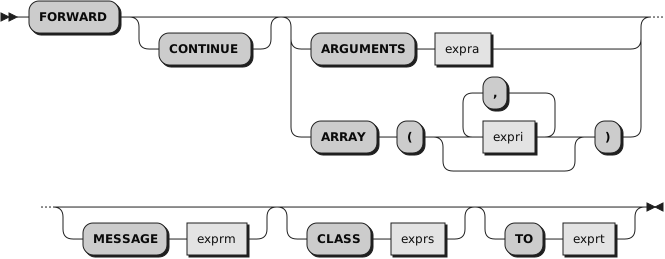
You can specify the options in any order.
FORWARD forwards the message that caused the currently active method to
begin running. The FORWARD instruction can change parts of the forwarded
message, such as the target object, the message name, the arguments, and the
superclass override.
If you specify the
TO option, the language processor evaluates
exprt to produce a new target object
for the forwarded message. The
exprt
is a literal string, a constant symbol, an environment symbol, or an expression enclosed in parentheses.
If you do not specify the
TO option, the initial value of the Rexx special
variable SELF is used.
If you specify the
ARGUMENTS option, the language processor
evaluates
expra to produce an
array object that supplies the set of arguments for
the forwarded message. The
expra can be a
literal string, a constant symbol, an environment symbol, or an expression enclosed in parentheses. The
ARGUMENTS value must evaluate to a Rexx array object.
If you specify the
ARRAY option, each
expri is an expression (use
commas to separate the expressions). The language processor evaluates the
expression list to produce a set of arguments for the forwarded message. It
is an error to use both the
ARRAY and the
ARGUMENTS options on the same FORWARD
instruction.
If you specify neither
ARGUMENTS nor
ARRAY, the language processor uses
the same arguments specified on the original method call.
If you specify the
MESSAGE option, the
exprm is a literal string,
a constant symbol, an environment symbol, or an expression enclosed in parentheses. If you specify
an expression enclosed in parentheses, the language processor evaluates the
expression to obtain its value. The uppercase character string value of the
MESSAGE option is the name of the message that the FORWARD instruction issues.
If you do not specify
MESSAGE, FORWARD uses the message name used to call
the currently active method.
If you specify the
CLASS option, the
exprs is a literal string,
a constant symbol, an environment symbol, or an expression enclosed in parentheses. This is the class
object used as a superclass specifier on the forwarded message.
If you do not specify CLASS, the message is forwarded without a superclass
override.
If you do not specify the
CONTINUE option,
the language processor immediately
exits the current method before forwarding the message. Results returned from
the forwarded message are the return value from the original message that
called the active method (the caller of the method that issued the FORWARD
instruction). Any conditions the forwarded message raises are raised in the
calling program (without raising a condition in the method issuing the FORWARD
instruction).
If you specify the
CONTINUE option, the current method does not exit and
continues with the next instruction when the forwarded message completes.
If the forwarded message returns a result, the language processor assigns
it to the special variable RESULT. If the message does not return a result,
the language processor drops (uninitializes) the variable RESULT.
The FORWARD instruction passes all or part
of an existing message invocation
to another method. For example, the FORWARD instruction can forward a message
to a different target object, using the same message name and arguments.
Example 2.12. Instructions — FORWARD
::method substr
  forward to (self~string)       /* Forward to the string value */
You can use FORWARD in an UNKNOWN method to reissue to another object the
message that the UNKNOWN method traps.
Example 2.13. Instructions — FORWARD
::method unknown
  use arg msg, args
  /* Forward to the string value */
  /* passing along the arguments */
  forward to (self~string) message (msg) arguments (args)
You can use FORWARD in a method to forward a message to a superclass's
methods, passing the same arguments. This is very common usage in object INIT
methods.
Example 2.14. Instructions — FORWARD
::class  savings subclass account
::method init
  expose type penalty
  forward class (super) continue       /* Send to the superclass      */
  type = "Savings"                     /* Now complete initialization */
  penalty = "1% for balance under 500"
In the preceding example, the
CONTINUE option causes the FORWARD message
to continue with the next instruction, rather than exiting the Savings class
INIT method.