7.2.1.1. Locating External Rexx Files
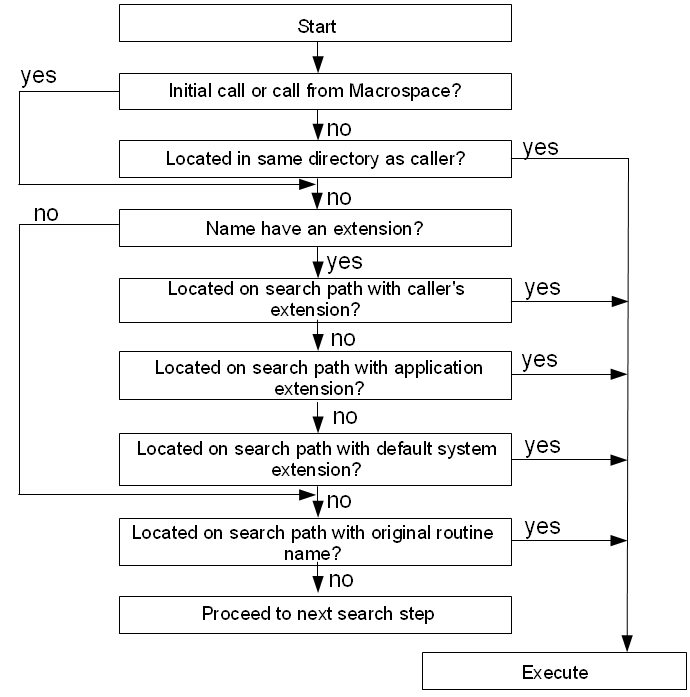
Rexx uses an extensive search procedure for locating program files. The first
element of the search procedure is the locations that will be checked for files. The
locations, in order of checking, are:
The second element of the search process is the file extension. If the
routine name contains at least one period, then this routine is extension
qualified. The search locations above will be checked for the target file unchanged, and
no additional steps will be taken. If the routine name is not extension qualified, then
additional searches will be performed by adding file extensions to the name.
All directory locations will be checked for a given extension before
moving to the next potential extension.
The following extensions may be used:
There are some file system considerations involved when searching for files.
Windows file systems typically are case insensitive, so files can be located regardless of how
the call is specified. Unix-like systems typically have a case sensitive file system, so files must
be exact case matches in order to be located. For these systems, each time a file name
probe is attempted, the name will be tried in the case specified and also as a lower case
name. The check is not performed on the very last step that uses the file name without an extension to
avoid unintentional conflicts with other executable files.
Note that for function or subroutine calls using an unquoted name, the target name is the
string value of the name symbol, which will be an uppercase value. Thus calls to myfunc(), MyFunc(),
and myFUNC() all trigger a search for a function named "MYFUNC". Calls specified as a quoted string
will maintain the original string case. Thus 'myfunc'() and 'MyFunc'() would search for different names.