9.3. Templates Containing Positional (Numeric) Patterns
A positional pattern is a
number that identifies the character position at which the data in the source
string is to be split. The number must be a whole number.
An absolute positional pattern is:
A number with
no plus (
+) or minus
(
-) sign preceding it or with
an equal sign (
=)
preceding it.
The number specifies the absolute character position at which the source
string is to be split.
Here is a template with absolute positional patterns:
variable1 11 variable2 21 variable3
The numbers
11 and
21 are absolute positional patterns.
The number
11 refers to the 11th position in
the input string,
21 to the 21st position.
This template puts characters:
1 through 10 of the source string into
variable111 through 20 into
variable2
21 to the end into
variable3
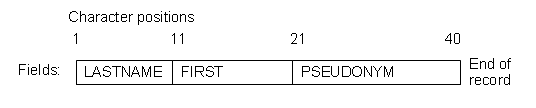
Positional patterns are probably most useful for working with a file of
records, such as:
The following example uses this record structure:
Example 9.9. Parsing stems
/* Parsing with absolute positional patterns in template         */
record.1="Clemens   Samuel    Mark Twain          "
record.2="Evans     Mary Ann  George Eliot        "
record.3="Munro     H.H.      Saki                "
do n=1 to 3
  parse var record.n lastname 11 firstname 21 pseudonym
  If lastname="Evans" & firstname="Mary Ann" then say "By George!"
end                         /* Says "By George!" after record 2  */
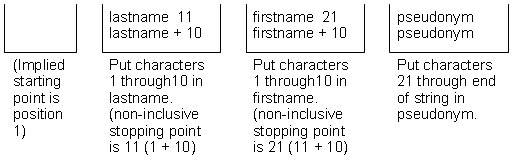
The source string is split at character position 11 and at position 21.
The language processor assigns characters 1 to 10 to
lastname,
characters 11 to 20 to
firstname, and
characters 21 to 40 to
pseudonym.
The template could have been:
1 lastname 11 firstname 21 pseudonym
lastname 11 firstname 21 pseudonym
Specifying
1 is optional.
Optionally, you can put an equal sign
before a number in a
template. An equal sign is the same as no sign before a number in a template.
The number refers to a particular character position in the source string.
These two templates are equal:
lastname 11 first 21 pseudonym
lastname =11 first =21 pseudonym
A
relative positional pattern
is a number with a plus (
+) or
minus (
-) sign preceding it. It can also be an
expression within parentheses, with a plus (
+)
or minus (
-) sign preceding the left
parenthesis; for details see
Section 9.4, “Parsing with Variable Patterns”.
The number specifies the relative character position at which the source
string is to be split. The plus or minus indicates movement right or left,
respectively, from the start of the string (for the first pattern) or from
the position of the last match. The position of the last match is the first
character of the last match. Here is the same example as for absolute positional
patterns done with relative positional patterns:
Example 9.10. Parsing with relative positional patterns
/* Parsing with relative positional patterns in template         */
record.1="Clemens   Samuel    Mark Twain          "
record.2="Evans     Mary Ann  George Eliot        "
record.3="Munro     H.H.      Saki                "
do n=1 to 3
  parse var record.n lastname +10 firstname + 10 pseudonym
  If lastname="Evans" & firstname="Mary Ann" then say "By George!"
end                                             /* same results  */
Whitespace characters between the sign and the number are insignificant.
Therefore,
+10 and
+ 10 have the same meaning. Note that
+0 is a valid relative positional pattern.
Absolute and relative positional patterns are interchangeable except in
the special case
(see
Section 9.8.2, “Combining String and Positional Patterns”) when a
string pattern precedes a
variable name and a positional pattern follows the variable name. The templates
from the examples of absolute and relative positional patterns give the same
results.
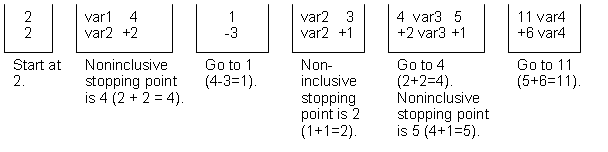
With positional patterns, a matching operation can back up to an earlier
position in the source string. Here is an example using absolute positional
patterns:
/* Backing up to an earlier position (with absolute positional)  */
string="astronomers"
parse var string 2 var1 4 1 var2 2 4 var3 5 11 var4
say string "study" var1||var2||var3||var4
/* Displays: "astronomers study stars"                           */
The absolute positional pattern
1 backs
up to the first character in the source string.
With relative positional patterns, a number preceded by a minus sign backs
up to an earlier position. Here is the same example using relative positional
patterns:
/* Backing up to an earlier position (with relative positional)  */
string="astronomers"
parse var string 2 var1 +2 -3 var2 +1 +2 var3 +1 +6 var4
say string "study" var1||var2||var3||var4      /* same results   */
In the previous example, the relative positional pattern
-3 backs
up to the first character in the source string.
The templates in the previous two examples are equivalent.
You can use templates with positional
patterns to make several assignments:
/* Making several assignments                                    */
books="Silas Marner, Felix Holt, Daniel Deronda, Middlemarch"
parse var books 1 Eliot 1 Evans
/* Assigns the (entire) value of books to Eliot and to Evans.    */
A
length positional pattern
is a number with a
> or
< preceding it.
It can also be an expression within parentheses, with a
>
or
< preceding the left parenthesis;
for details see
Section 9.4, “Parsing with Variable Patterns”.
The number specifies the length at which the source
string is to be split, relative to the current position.
The
> or
< indicates movement right or left,
respectively, from the start of the string (for the first pattern) or from
the position of the last match. The position of the last match is the first
character of the last match. Here is the same example as for relative positional
patterns done with length positional patterns:
Example 9.11. Parsing with relative positional patterns
/* Parsing with relative positional patterns in template         */
record.1="Clemens   Samuel    Mark Twain          "
record.2="Evans     Mary Ann  George Eliot        "
record.3="Munro     H.H.      Saki                "
do n=1 to 3
  parse var record.n lastname >10 firstname >10 pseudonym
  If lastname="Evans" & firstname="Mary Ann" then say "By George!"
end                                             /* same results  */
Whitespace characters between the trigger and the number are insignificant.
Therefore,
>10 and
> 10 have the same meaning.
Note that
>0 and
<0 are valid length positional patterns.
The
> length pattern and the
+ relative
positional pattern are interchangeable except in the special case of the value
0.
A
>0 pattern will split the string into a null string and leave
the match position unchanged.
This is particularly useful for parsing off length-qualified fields from a string.
Example 9.12. Parsing with length patterns
/* Parsing with length patterns in template         */
line = "04Mark0005Twain"
parse var line len +2 first >(len) len +2 middle >(len) len +2 last >(len)
say '"'first'" "'middle'" "'last'"'  -- displays "Mark" "" "Twain"

/* parsing with relative patterns only */
parse var line len +2 first +(len) len +2 middle +(len) len +2 last +(len)
say '"'first'" "'middle'" "'last'"'  -- displays "Mark" "05Twain" "Twain"
The
< length pattern will move the position to the left,
and split the string between the original position and the movement position.
At the end of the operation, the current position is returned to the original position.
This movement is equivalent to using a negative relative pattern followed by a
positive relative pattern for the same length.
This operation allows for easy extraction of characters that precede a string match.
Example 9.13. Parsing with length patterns
/* Parsing with length patterns in template         */
parse value '12345.6789' with '.' digit <1    -- digit -> "5"

/* parsing with relative patterns only */
parse value '12345.6789' with '.' -1 digit +1    -- digit -> "5"