Product Site

8.64. SysTextScreenSize (Windows only)

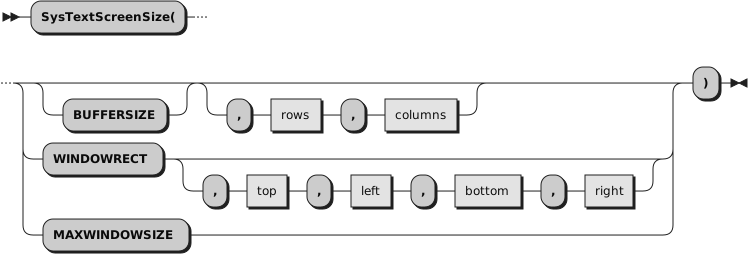
Returns or sets the size of the console screen buffer, returns or sets the position of the current console window rectangle, or returns the maximum possible console window size.

Parameters:
option

Specifies which size or position is to be returned or set.
BUFFERSIZE

Returns or sets the size of the current console buffer. This is the default.

If a size is returned, it is a string of the form rows columns, where rows is the height and columns is the width in terms of character cells. If no character-mode console is attached, the string 0 0 is returned.
rows, columns

If both optional rows and columns are specified, the console buffer size is changed to the height and width given by rows and columns. The buffer size cannot be smaller than the size of the current console window. If the function succeeds, it returns 0, otherwise a Windows System Error code is returned.
WINDOWRECT

Returns or sets the position of the current console window rectangle.

If a position is returned, it is a string of the form top left bottom right, where (top, left) and (bottom, right) are absolute character-cell coordinates in the current console buffer, with the origin (0, 0) at the upper-left corner. If no character-mode console is attached, the string 0 0 0 0 is returned.
top, left, bottom, right

If all optional arguments top, left, bottom, and right are specified, the position of the current console window rectangle is changed to the given (top, left) and (bottom, right) positions. Both positions must be within the boundaries of the current console buffer. If the function succeeds, it returns 0, otherwise a Windows System Error code is returned.
MAXWINDOWSIZE

Returns the maximum possible console window size, considering the size of the current console screen buffer, the chosen window font, and the screen size.

The size is returned as a string of the form rows columns, where rows is the height and columns is the width in terms of character cells. If no character-mode console is attached, the string 0 0 is returned.
Example 8.46. RexxUtil — SysTextScreenSize
parse value SysTextScreenSize() with rows columns
parse value SysTextScreenSize("windowrect") with top left bottom right
say "current console buffer is" rows "rows by" columns "columns"
say "current window rectangle is ("top"," left") ("bottom"," right")"