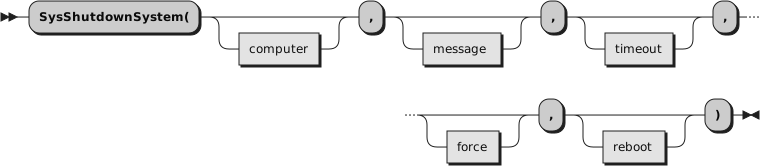
8.54. SysShutdownSystem (Windows only)
Once this function has been called, the initiated shutdown cannot be aborted—data loss may occur!
Provides an interface to the
InitiateSystemShutdown() API on Windows.
If the user has sufficient privileges, this function can be used to shut down the local machine or a
remote system. In general all users have sufficient privileges to shut down the local machine and only
Administrators have sufficient privileges to shut down remote machines.
The user of this function is
strongly encouraged to read the Microsoft
documentation for
InitiateSystemShutdown() to understand the finer
points to using this function. The documentation is freely available online. A Google search
using
InitiateSystemShutdown MSDN will provide a link to the
documentation. In particular, this function can be used to force a shut down of a system while users
are logged on and applications have unsaved data.
If the
timeout argument is not 0, a shut down dialog is displayed on
the machine being shut down, naming the user who initiated the shut down, a timer counting down the
seconds until the machine is shut down, and prompting the user to log off. This dialog can be moved but
it can not be closed and remains on top of all other windows on the system.
If any open application has unsaved data, the operating system gives the application a chance to prompt
the user to save and close the application. If the
force argument is
false, the shut down will be delayed until the user responds, and ultimately the user could cancel the
shut down. If the
force argument is true the system will force the
application closed whether the data gets saved or not. The application is still given a chance to
prompt the user to save the data, but the user only has a few seconds to respond before the system
forcibly closing the application.
The implications of the preceding two paragraphs are this, if the
timeout argument is 0 and the
force
argument is true, the system immediately shuts down and any unsaved data is forever lost. This is why
the user of this function is encouraged to fully understand this function before using it.
- computer
Indicates which system to shut down. If omitted or the empty string, the local machine is shut down.
Otherwise this should be the network name of the remote machine.
- message
An additional message that is added to the shut down dialog. If omitted, no additional message is
added.
- timeout
The time, in seconds, before the system is shut down. If this value is 0, the system is immediately
shut down and no shut down dialog is displayed. The shut down can not be aborted. If omitted the
default time out is 30 seconds.
- force
If this argument is true, applications with unsaved data will be forced close by the system whether the
data is saved or not. If false, the shut down is delayed until applications with unsaved data responds.
If an application does not respond, the user will be prompted by the system to end the application. At
this point, if the user chooses not to forcibly end the application, the shut down will be aborted.
Please
note some consequences of this argument as described by
Microsoft. If this argument is false, i.e. applications are not forced to close, and an application
with unsaved changes is running on the console session, the shutdown will remain in progress until the
user logged into the console session aborts the shutdown, saves changes, closes the application, or
forces the application to close. During this period, the shutdown
may not
be aborted except by the console user, and another shutdown
may not
be initiated. Using true for this argument prevents that situation. But, using true can also
result in unsaved data being lost.
- reboot
If this argument is true, the system is rebooted after the shut down. If it is false, the system is
shut down. The default if omitted is false.
Returns
0 for success or a Windows
System Error code
for failure. For instance a return of 1300 would indicate the user does not
have sufficient privileges to shut down the named system.
Use
SysGetErrorText
to get a generic text description for any Windows System Error code.
For example, the description for error code 1300 is
Not all
privileges referenced are assigned to the caller.