Product Site

8.25. SysFromUnicode (Windows only)

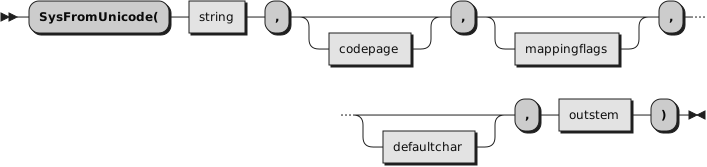
Translate a Windows UTF-16 string to a character string in the specified code page. The translated character string and additional information is returned in outstem.

This function calls the Windows API WideCharToMultiByte for the conversion. Any requirements or restrictions of this API apply here.

See also SysToUnicode (Windows only).

Parameters
string

A string containing the UTF-16 characters to be translated.
codepage

Specifies the code page to which string should be translated. If omitted, OEMCP, the system's OEM code page is used.

Code pages can be specified by their numeric identifier, like 437 or 1252. A list of these numeric code page identifiers can be found in the Windows App Development documentation, currently at https://learn.microsoft.com/en-us/windows/win32/Intl/code-page-identifiers. Also, one of the following strings can be specified:
ACP

The system default Windows ANSI code page.
CONSOLE

The current Windows console code page.
MACCP

The system Macintosh code page (legacy, not recommended).
OEMCP

The system OEM code page.
SYMBOL

The Symbol code page (legacy, not recommended).
THREAD_ACP

The Windows ANSI code page for the current thread.
UTF7

Translate to UTF-7 (not recommended, use UTF8 instead).
UTF8

Translate to UTF-8.
mappingflags

Flags indicating the conversion type. The function performs more quickly when none of these flags are set. A combination of any of the following flags can be used:
COMPOSITECHECK

Tests for decomposed UTF-16 characters and attempts to compose them before converting them to the requested code page. Decomposed, or composite, UTF-16 characters consist of a base character and one or more nonspacing characters. For example, in the character è, the e is the base character and the accent grave mark is the nonspacing character.

This flag can be specified together with any of the following flags. These flags determine the behavior when no precomposed mapping for a base-nonspacing character combination in a UTF-16 string is available. If none of these additional flags are specified, the translation behaves as if SEPCHARS had been specified.
DEFAULTCHAR

Replace exceptions with the default character during conversion.
DISCARDNS

Discard nonspacing characters during conversion.
SEPCHARS

Default. Generate separate characters during conversion.
ERR_INVALID_CHARS

Make the translation fail with return code 1113 if an invalid UTF-16 input character is encountered. This flag can only be specified with codepage UTF8 or 54936.
NO_BEST_FIT_CHARS

Translate any UTF-16 characters that do not translate directly to multibyte equivalents to the default character. This flag prevents the translation from mapping characters to characters that appear similar but have very different semantics, like translating ∞ (infinity) to 8.
defaultchar

The character to be used if a UTF-16 character cannot be represented in the specified code page. If this parameter is omitted, or or a null string, the default character for the code page is used. This default character typically is a question mark.
outstem

The name of the stem variable that will contain the converted result. If the conversion was successful the following compound variables are set:
outstem.!USEDDEFAULTCHAR

This variable is set to .true if the defaultchar was used during the conversion, and to .false if it was not.
outstem.!TEXT

This variable contains the converted string.

Return codes
0

No error.
Other

A Windows operating system error code, which may be one of the following, but could be others.
87

The parameter is incorrect. Possible reasons are
  • string length is not even (not a UTF-16 string)
  • string length is larger than 2 GB
  • codepage number is not a valid Windows code page
1004

Invalid flags. Possible reasons are
  • the flag COMPOSITECHECK was not specified when one of the flags DEFAULTCHAR, DISCARDNS, or SEPCHARS was specified
  • the flag ERR_INVALID_CHARS was specified with a codepage other than UTF8 or 54936
1113

No mapping for the Unicode character exists in the target multi-byte code page. A possible reason is
  • an invalid UTF-16 input character was encountered when the flag ERR_INVALID_CHARS was specified with a codepage UTF8 or 54936
Example 8.16. RexxUtil — SysFromUnicode
-- two steps to convert a string from one code page to another
string = '64 C3A9 6A C3A0 20 76 75'x -- UTF-8 encoded
-- step 1: convert the string from its codepage to UTF-16
call SysToUnicode string, "UTF8", , out.
-- step 2: convert the UTF-16 string to the desired output codepage
call SysFromUnicode out.!text, "CONSOLE", , , out.
say out.!text -- déjà vu