Product Site

8.22. SysFileTree

Returns a list of all files that match a file specification. SysFileTree can return file information like date, time, size, attributes, and file name. The default format for date and time is platform specific.

SysFileTree uses operating system APIs to find the files. The found files are placed in the returned list in the order they are found by the operating system. No specific order can be assumed.

Parameters:
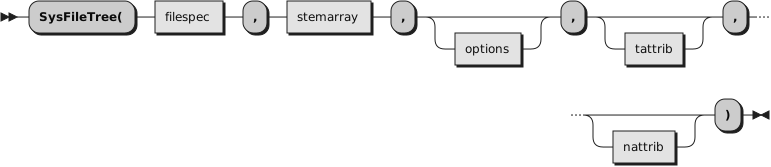
filespec [required]

The search pattern, the search file specification. This can not be the empty string.

The search pattern can be a full or partial path with wildcard characters in the last part of the path information, e. g. *.bat, or ../../*.sh, or c:\temp. Windows supports wildcard characters * and ?, Unix-like systems additionally support character classes in [ ] brackets, including - for ranges and ! for negation.
stemarray [required]

A Rexx stem or array variable for the returned matches. If a stem variable, stem.0 is set to n, the number of matches returned, and the matching files or directories are returned in stem.1 to stem.n.
options [optional]

A string with any combination of the following. If this argument is omitted, it defaults to B.
B

Search for both files and directories. This is the default.
D

Search for directories only.
F

Search for files only.
H

Returns correct file sizes for files larger than 9999999999 bytes (approx. 10 GB). Without this option, the maximum file size returned is 9999999999, even if the file is larger than this.
I

Perform a case-insensitive search for file names or directories. This option is only used on system that support case-sensitive file names and is ignored on systems like Windows where the file system is case-insensitive by default.
L

Returns the file date and time in the form YYYY-MM-DD HH:MM:SS.
O

Returns only the fully-qualified file name.
S

Search subdirectories recursively.
T

Returns the file date and time in the form YY/MM/DD/HH/MM. If the L option is also specified then this option will be ignored.
tattrib [optional] [Windows only]

The target attribute mask for file specification matches. Only files that match the target mask are returned. The default mask is *****. This returns all files regardless of the settings (clear or set) of the Archive, Directory, Hidden, Read-Only, and System attributes. The target mask attributes must appear in the order ADHRS. This argument is Windows only. It is allowed but ignored on Unix-like systems.

Target Mask Options
*

The file attribute may be any state.
+

The file attribute must be set.
-

The file attribute must be cleared.

Target Mask Examples
***+*

Find all files with the Read-Only attribute set.
+**+*

Find all files with the Read-Only and Archive attributes set.
*++**

Find all hidden subdirectories.
---+-

Find all files with only the Read-Only attribute set.
nattrib [optional] [Windows only]

The new attribute mask for setting the attributes of each matching file. The default mask is *****. This means not to change the Archive, Directory, Hidden, Read-Only, and System attributes. The target mask attributes must appear in the order ADHRS. This argument is Windows only. It is allowed but ignored on Unix-like operating systems.

New Attribute Mask Options
*

Do not change the file attribute.
+

Set the file attribute.
-

Clear the file attribute.

New Attribute Mask Examples
***+*

Set the Read-Only attribute on all files.
-**+*

Set the Read-Only attribute and clear the Archive attribute of each file.
+*+++

Set all file attributes, except the directory attribute.
-----

Clear all attributes on all files.

Note

You cannot set the directory attribute on non-directory files. SysFileTree returns the file attribute settings after the new attribute mask has been applied.

Return codes:
0

Successful.
2

Not enough memory.
other

On Windows, the return code may be any System Error Code returned by the operating system.
Example 8.13. RexxUtil — SysFileTree
/* Find all subdirectories on C: */
call SysFileTree "c:\*.*", "file", "SD"

/* Find all executable (.exe) files under Program Files*/
ret = SysFileTree('C:\Program Files\*.exe', f, 'FS')

/* Find all Read-Only files */
call SysFileTree "c:\*.*", "file", "S", "***+*"

/* Clear Archive and Read-Only attributes of files that have them set */
call SysFileTree "c:\*.*", "file", "S", "+**+*", "-**-*"

/****<< Sample Code and Output Example.>>********/

call SysFileTree "c:\win*", file., "b"
do i = 1 to file.0
  say file.i   -- 3/12/21   1:56p           0  -D---  c:\Windows
end