Product Site

8.3. RxMessageBox (Windows only)

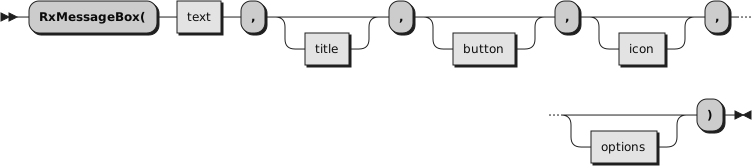
Displays a modal dialog box with a title, a message text, an optional icon, and a set of buttons. The dialog box is displayed using the Windows MessageBox() function.

RxMessageBox returns one of the following integer values indicating which button the user clicked.
1

The OK button was pressed
2

The Cancel button was pressed
3

The Abort button was pressed
4

The Retry button was pressed
5

The Ignore button was pressed
6

The Yes button was pressed
7

The No button was pressed
10

The Try Again button was pressed
11

The Continue button was pressed

If a message box has a Cancel button, the function returns the value 2 if either the ESC key is pressed or the Cancel button is selected. If the message box has no Cancel button, pressing ESC will have no effect unless an OK button is present. If an OK is displayed and the user presses ESC, the return value will be 1.

If the Windows MessageBox() function fails, the return value is zero.
text

The message box text.
title

The message box title. The default title is Error.
button

The message box push button style.
OK

The message box contains one push button: OK. This is the default.
OKCANCEL

The message box contains two push buttons: OK and Cancel.
RETRYCANCEL

The message box contains two push buttons: Retry and Cancel.
ABORTRETRYIGNORE

The message box contains three push buttons: Abort, Retry, and Ignore.
CANCELTRYCONTINUE

The message box contains three push buttons: Cancel, Try Again, and Continue. Use this message box button style instead of ABORTRETRYIGNORE.
YESNO

The message box contains two push buttons: Yes and No.
YESNOCANCEL

The message box contains three push buttons: Yes, No, and Cancel.
icon

The message box icon. The default is NONE. Allowed icons are:
NONE

No icon is displayed.
INFORMATION, ASTERISK

A stop-sign icon appears in the message box.
WARNING, EXCLAMATION

An exclamation-point icon appears in the message box.
ERROR, HAND, STOP

An icon consisting of a lowercase letter i in a circle appears in the message box.
QUESTION, QUERY

A question-mark icon appears in the message box. This icon is no longer recommended.
option

More than one of the following options may be specified. If neither DEFBUTTON2, DEFBUTTON3, nor DEFBUTTON4 is specified, the first button is the default button. Allowed options are:
DEFBUTTON2

The second button is the default button.
DEFBUTTON3

The third button is the default button.
DEFBUTTON4

The fourth button is the default button.
RIGHT

The message box text is right-justified.
TOPMOST

The message box is placed above all non-topmost windows and stays above them, even when the window is deactivated.
Example 8.1. RexxUtil — RxMessageBox
-- Give option to quit
if RxMessageBox("Shall we continue?", "", "YesNo", "Question") = 7
  then exit  -- "No" button clicked, exit