Product Site

18.4. The RXQUEUE Filter

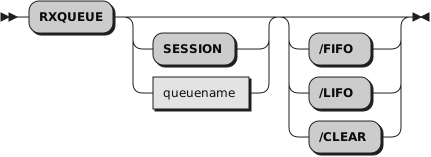
The RXQUEUE filter usually operates on the default queue named SESSION. However, if an environment variable named RXQUEUE exists, the RXQUEUE value is used for the queue name.

For a full description of Rexx queue services for applications programming, see Section 14.1.3, “External Data Queue”.

Parameters:
queuename

The name of the named Rexx queue to stack or queue items to. If no queuename is given, SESSION is used.
/FIFO

queues items from STDIN first in, first out (FIFO) on the Rexx queue. This is the default.
/LIFO

stacks items from STDIN last in, first out (LIFO) on the Rexx queue.
/CLEAR

removes all lines from the Rexx queue.

RXQUEUE takes output lines from another program and places them on a Rexx queue. There is currently a limit of 65472 characters for a single line. If a line contains more characters than the limit, those characters are discarded.

A Rexx procedure can use RXQUEUE to capture operating system command and program output for processing. RXQUEUE can direct output to any Rexx queue, either FIFO (first in, first out) or LIFO (last in, first out).

RXQUEUE uses the environment variable RXQUEUE for the default queue name. When RXQUEUE does not have a value, RXQUEUE uses SESSION for the queue name.

The following example obtains the Windows version number with RXQUEUE:
Example 18.2. Command RXQUEUE
-- Use RXQUEUE to get the Windows version number with the VER command
-- VER displays two lines: a blank line, and a line in the format
-- Microsoft Windows [Version nn.n.nnnnn.nnnn]

"VER | RXQUEUE"             -- put the VER output on the Queue
pull .                      -- discard the blank line
pull . "VERSION" number "]" -- parse out the version number
say "We are running on Windows Version" number

Note that the syntax of the version string that is returned by Windows can vary, so the parsing syntax for retrieving the version number may be different.

The following example processes output from the Windows DIR command:
Example 18.3. Command RXQUEUE
-- Use RXQUEUE to filter the output from a Windows DIR command
-- Display a list of all files larger than 10000 bytes with their
-- file sizes, and finally print the sum of the sizes of all large files

size_limit = 10000          -- dividing line between large and small
size_total = 0              -- sum of large file sizes
numeric digits 14           -- handle very large file sizes

-- Create a new queue so that this program cannot interfere with data
-- placed on the queue by another program.
queue_name = rxqueue("Create")
call rxqueue "Set", queue_name

-- request DIR output in the date/time/size/name format
-- with no thousands separator in file sizes
"DIR /N /-C | RXQUEUE" queue_name

-- discard five header lines
do 5
  pull .
end

-- now all lines are file or directory lines, except for two at the end
do queued() - 2             -- ignore last two lines
  parse pull . . size name  -- parse file name and file size
  -- we ignore "<DIR>" lines and small files
  if size <> "<DIR>", size > size_limit then do
    say format(size, 14) name
    size_total = size_total + size
  end
end

say "The total size of files larger than" size_limit "bytes is" size_total

-- we delete our queue, which discards the lines remaining in it
call rxqueue "Delete", queue_name