Throughout this book, syntax is described using the structure defined below.
Read the syntax diagrams from left to right, from top to bottom, following
the path of the line.
The
symbol indicates the beginning of a statement.
The
symbol indicates that the statement syntax is continued on the next line.
The
symbol indicates that a statement is continued from the previous line.
The
symbol indicates the end of a statement.

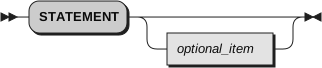
Required items appear on the horizontal line (the main path).
Optional items appear below the main path.
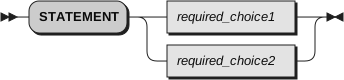
If you can choose from two or more items, they appear vertically, in a
stack. If you must choose one of the items, one item of the stack appears on the main path.
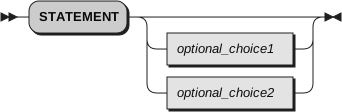
If choosing one of the items is optional,
the entire stack appears below the main path.
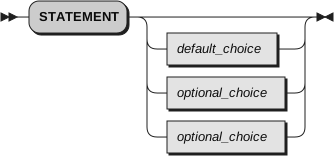
If one of the items is the default,
it is usually the topmost item of the stack of items below the main path.
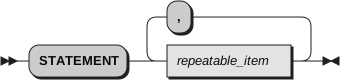
A path returning to the left above the main line indicates an item that
can be repeated.
A repeat path above a stack indicates that you can repeat the
items in the stack.
A pointed rectangle around an item indicates that the item is a fragment, a part of the syntax diagram that appears in
greater detail below the main diagram.
Keywords appear in uppercase (for example, SIGNAL). They must
be spelled exactly as shown but you can type them in upper, lower, or mixed
case. Variables appear in all lowercase letters (for example, index). They represent user-supplied names or values.
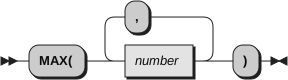
If punctuation marks, parentheses, arithmetic operators, or such symbols
are shown, you must enter them as part of the syntax.
The following example shows how the syntax is described: