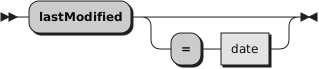
/* On Windows */
say .File~new("C:\Program Files")~lastModified~class  -- The DateTime class
say .File~new("C:\Program Files")~lastModified        -- e.g. 2018-06-18T11:20:17.000000
say .File~new("dummy")~lastModified                   -- e.g. The NIL object


/* A possible implementation of : touch -c -m -r referenceFile file
   -c, --no-create             do not create any files
   -m                          change only the modification time
   -r, --reference=FILE        use this file's time instead of current time
*/
parse arg referenceFilePath filePath .
file = .File~new(filePath)
if \file~exists then
  return 0         -- OK, not an error
referenceFile = .File~new(referenceFilePath)
referenceDate = referenceFile~lastModified
if referenceDate == .nil then
  return 1         -- KO
file~lastModified = referenceDate
return 0           -- OK