10.3. Exponential Notation
For both large and small numbers, an exponential notation can be useful.
For example:
numeric digits 5
say 54321*54321
would display
2950800000 in the long
form. Because this is misleading, the result is expressed as
2.9508E+9 instead.
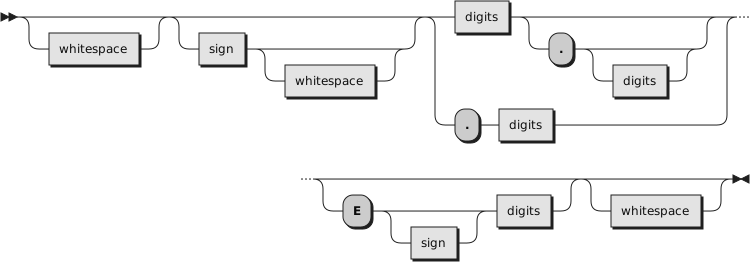
The definition of numbers is, therefore, extended as follows:
The integer following the
E
represents a power of ten that is to be applied to the number. The
E can be in uppercase or lowercase.
Certain character strings are numbers even though they do not appear to
be numeric, such as
0E123 (0 times 10 raised to the
power of 123) and
1E342 (1 times 10 raised to the
power of 342). Also, a comparison such as
0E123=0E567 gives a true result of
1 (0 is equal to 0).
To prevent problems when comparing nonnumeric strings, use the strict
comparison operators.
Example 10.5. Exponential notation
Say 12E7   =    120000000           /* Displays "1" */
Say 12E-5  =    0.00012             /* Displays "1" */
Say -12e4  =    -120000             /* Displays "1" */
Say 0e123  =    0e456               /* Displays "1" */
Say 0e123  ==   0e456               /* Displays "0" */
The results of calculations are returned in either conventional or
exponential form, depending on the setting of
NUMERIC DIGITS. If the number of places
needed before the decimal point exceeds DIGITS, or the number of places after
the point exceeds twice DIGITS, the exponential form is used. The exponential
form the language processor generates always has a sign following the
E to improve readability. If the exponent is
0, the exponential
part is omitted—that is, an exponential part of
E+0 is not
generated.
You can explicitly convert numbers to exponential form, or force them to
be displayed in the long form, by using the
FORMAT built-in function.
Scientific
notation is a form of exponential notation that adjusts the power of
ten so that the number contains only one nonzero digit before the decimal
point. Engineering notation is a form of exponential
notation in which up to three digits appear before the decimal point, and
the power of ten is always a multiple of three. The integer part can, therefore,
range from
1 through
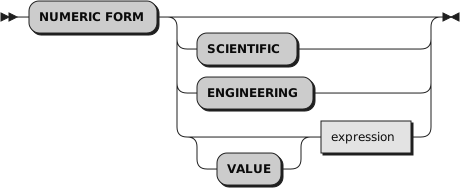
999. You can control whether scientific
or engineering notation
is used with the following instruction:
Scientific notation is the default.
Example 10.6. Scientific notation
/* after the instruction */
Numeric form scientific

123.45 * 1e11     -->     1.2345E+13

/* after the instruction */
Numeric form engineering

123.45  * 1e11    -->    12.345E+12