Product Site

7.4.61.1.1. Command Strings

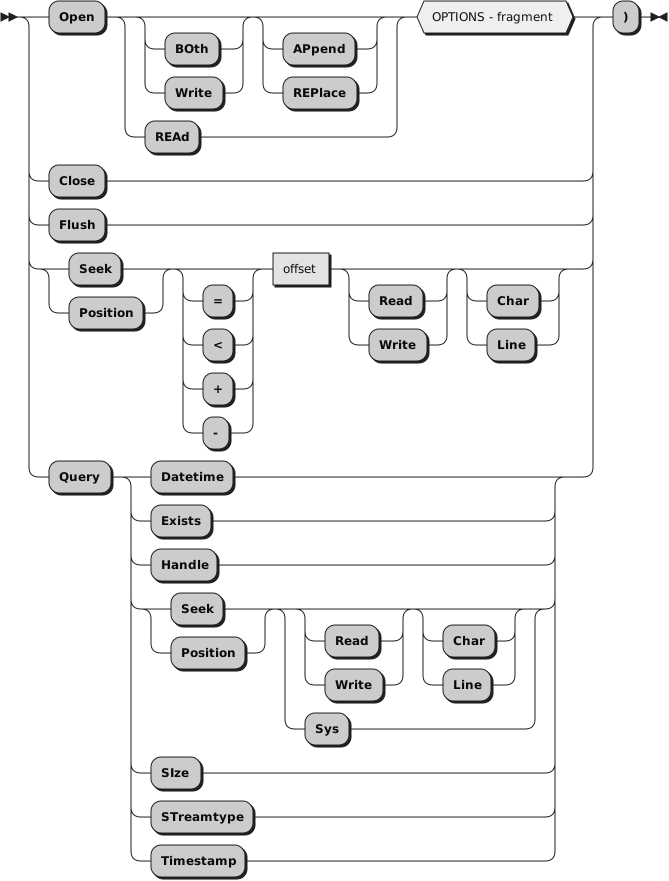
The argument stream_command can be any expression that the language processor evaluates to a command string that corresponds to the following diagram:

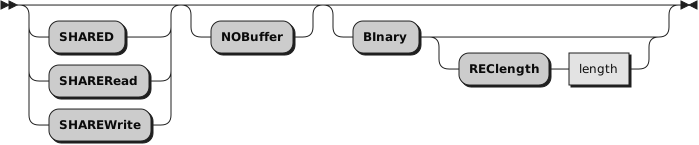
OPTIONS:
OPEN

opens the named stream. The default for OPEN is to open the stream for both reading and writing data, for example, "OPEN BOTH".

The STREAM function itself returns a description string similar to the one that the D option provides, for example, "READY:" if the named stream is successfully opened, or "ERROR:2" if the named stream is not found.

The following is a description of the options for OPEN:
READ

opens the stream for reading only.
WRITE

opens the stream for writing only.
BOTH

opens the stream for both reading and writing. (This is the default.) Separate read and write pointers are maintained.
APPEND

positions the write pointer at the end of the stream. (This is the default.) The write pointer cannot be moved anywhere within the extent of the file as it existed when the file was opened.
REPLACE

sets the write pointer to the beginning of the stream and truncates the file. In other words, this option deletes all data that was in the stream when opened.
SHARED

Enables another process to work with the stream in a shared mode. This mode must be compatible with the shared mode (SHARED, SHAREREAD, or SHAREWRITE) used by the process that opened the stream.
SHAREREAD

Enables another process to read the stream in a shared mode.
SHAREWRITE

Enables another process to write the stream in a shared mode.
NOBUFFER

turns off buffering of the stream. Thus, all data written to the stream is flushed immediately to the operating system for writing. This option can severely affect output performance. Therefore, use it only when data integrity is a concern, or to force interleaved output to a stream to appear in the exact order in which it was written.
BINARY

causes the stream to be opened in binary mode. This means that line-end characters are ignored and treated as data. This is intended to force file operations that are compatible with other Rexx language processors that run on record-based systems, or to process binary data using the line operations.

Note

Specifying the BINARY option for a stream that does not exist but is opened for writing also requires the RECLENGTH option to be specified. Omitting the RECLENGTH option in this case raises an error condition.
RECLENGTH length

allows the specification of an exact length for each line in a stream. This allows line operations on binary-mode streams to operate on individual fixed-length records. Without this option, line operations on binary-mode files operate on the entire file (for example, as if the RECLENGTH option were specified with a length equal to that of the file). length must be 1 or greater.

Here are some examples:
Example 7.74. Builtin function STREAM
stream(strout,"c","open")
stream(strout,"c","open write")
stream(strinp,"c","open read")
stream(strinp,"c","open read shared")

CLOSE

closes the named stream. The STREAM function itself returns READY: if the named stream is successfully closed, or an appropriate error message. If an attempt is made to close an unopened file, STREAM returns a null string ("").
Example 7.75. Builtin function STREAM on unopened file
stream("STRM.TXT","c","close")

FLUSH

forces any data currently buffered for writing to be written to this stream.
SEEK offset

sets the read or write position within a persistent stream. If the stream is opened for both reading and writing and no SEEK option is specified, both the read and write positions are set.

Note

See Chapter 14, Input and Output Streams for a discussion of read and write positions in a persistent stream.

To use this command, the named stream must first be opened with the OPEN stream command or implicitly with an input or output operation. One of the following characters can precede the offset number:
=

explicitly specifies the offset from the beginning of the stream. This is the default if no prefix is supplied. Line Offset=1 means the beginning of stream.
<

specifies offset from the end of the stream.
+

specifies offset forward from the current read or write position.
-

specifies offset backward from the current read or write position.

The STREAM function itself returns the new position in the stream if the read or write position is successfully located or an appropriate error message otherwise.

The following is a description of the options for SEEK:
READ

specifies that the read position is to be set by this command.
WRITE

specifies that the write position is to be set by this command.
CHAR

specifies that the positioning is to be done in terms of characters. This is the default.
LINE

specifies that the positioning is to be done in terms of lines. For non-binary streams, this is an operation that can take a long time to complete, because, in most cases, the file must be scanned from the top to count line-end characters. However, for binary streams with a specified record length, this results in a simple multiplication of the new resulting line number by the record length, and then a simple character positioning. See Section 14.1.5, “Line versus Character Positioning” for a detailed discussion of this issue.

Note

If you do line positioning in a file open only for writing, you receive an error message.
Example 7.76. Builtin function STREAM examples
stream(name,"c","seek =2 read")
stream(name,"c","seek +15 read")
stream(name,"c","seek -7 write line")
fromend  = 125
stream(name,"c","seek <"fromend read)

POSITION
is a synonym for SEEK.