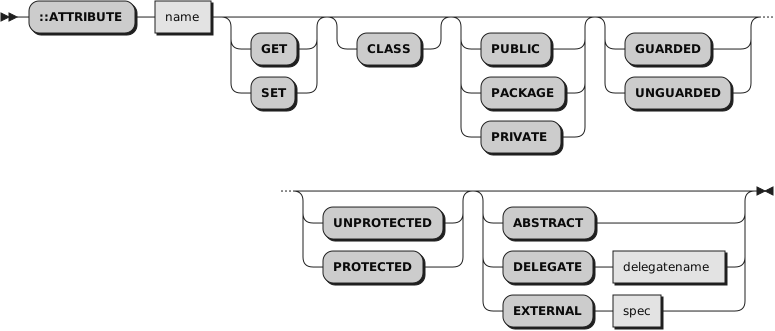
The ::ATTRIBUTE directive creates attribute methods and defines the
method properties.
The ::ATTRIBUTE directive creates accessor methods for object instance
variables. An accessor method allows an object instance variable to be
retrieved or assigned a value. ::ATTRIBUTE can create an attribute getter
method, a setter method, or the getter/setter pair.
The
name is a literal string or
a symbol that is taken as a constant. The
name must also be
a valid Rexx variable name. The ::ATTRIBUTE directive creates methods
in the class specified in the most recent ::CLASS directive. If no ::CLASS
directive precedes an ::ATTRIBUTE directive, the attribute methods are not
associated with a class but are accessible to the main (executable) part of a
program through the
.METHODS built-in object.
Only one ::ATTRIBUTE directive can appear for any method name not associated with a class.
If you do not specify either
GET or
SET,
::ATTRIBUTE will create two attribute methods with the
names
name and
name=.
These are the methods for getting and setting an attribute. These generated methods are
equivalent to the following code sequences:
Example 3.2. ATTRIBUTE directive equivalent code
::method name         -- attribute get method
  expose name         -- establish direct access to object variable (attribute)
  use strict arg      -- enforce zero parameters
  return name         -- return object variable's current value

::method "NAME="      -- attribute set method
  expose name         -- establish direct access to object variable (attribute)
  use strict arg name -- retrieve argument and assign it to the object variable
Both methods will be created with the same method properties (for example, PRIVATE, GUARDED, etc.).
If
GET or
SET are not specified, the pair of methods will be automatically
generated. In that case, there is no method code body following the directive,
so another directive (or the end of the program) must follow the
::ATTRIBUTE directive.
If
GET or
SET is specified, only the single get or set attribute method is generated.
Specifying separate
GET or
SET ::ATTRIBUTE directives allows the methods to be created with different properties.
For example, the
sequence:
::attribute name get
::attribute name set private
will create a
NAME method with PUBLIC access and a
NAME= method with PRIVATE access.
The
GET and
SET options may also be used to override the default method body generated for the attribute. This
is frequently used so the SET attribute method can perform new value validation.
Example 3.3. ATTRIBUTE directive — get and set methods
::attribute size get
::attribute size set
  expose size     /* establish direct access to object variable (attribute) */
  use arg value   /* retrieve argument                                      */
  if datatype(value, "Whole") = .false | value < 0  then
    raise syntax 93.906 array ("size", value)
  size=value
If you specify the
CLASS option, the created methods are class
methods. See
Chapter 4, Objects and Classes. The attribute methods are
associated with the class specified on the most recent ::CLASS directive. The
::ATTRIBUTE must be preceded by a ::CLASS directive if
CLASS is
specified.
If
ABSTRACT is specified, then all created methods will be marked as ABSTRACT and will
raise an error if directly invoked.
For ABSTRACT methods there is no method code body following the directive,
so another directive (or the end of the program) must follow the
::ATTRIBUTE directive.
If
DELEGATE is specified, execution of get method
name
and set method
name= (depending on whether
GET or
SET
or none of these two is specified on the ::ATTRIBUTE directive)
is delegated to object
delegatename.
It is a common design pattern to delegate method execution to an
embedded object.
The directive for such a delegation
::attribute name delegate delegateName
is equivalent to the following code sequence:
Example 3.4. DELEGATE subkeyword equivalent code
::method name
expose delegateName
forward to(delegateName)

::method "NAME="
expose delegateName
forward to(delegateName)
If the
EXTERNAL option is specified, then
spec
identifies a method in an external native library that will be invoked as the
named method. The
spec is a literal string containing a series
of whitespace-delimited tokens defining the external method. The first token
must be
LIBRARY, which indicates the method resides in a native library
of the type allowed on a ::REQUIRES directive. The second token must identify
the name of the external library. The external library is located using
platform-specific mechanisms for loading libraries. For Unix-like systems, the
library name is case-sensitive. The third token is optional and specifies the
name of the method within the library package. If not specified, the ::METHOD
name is used. The target package method name is case insensitive.
If the
GET or
SET option is not specified with the
EXTERNAL option, then
two method objects need to be created. The target method name is appended to
the string "GET" to derive the name of the getter attribute method. To generate
the setter attribute method, the name is appended to the string "SET".
If
GET or
SET is specified and the method name is not specified within
spec, then the target library method name
is generated by concatenating
name
with "GET" or "SET" as appropriate. If the method name is specified in
spec and
GET or
SET is specified, the spec
name will be used unchanged.
Example 3.5. ATTRIBUTE directive — naming the get and set methods
-- maps "NAME" method to "GETNAME and
-- "NAME=" to "SETNAME"
::ATTRIBUTE name EXTERNAL "LIBRARY mylib"
-- maps "ADDRESS" method to "GETADDRESS"
::ATTRIBUTE address GET EXTERNAL "LIBRARY mylib"
-- maps "ADDRESS=" method to "setHomeAddress"
::ATTRIBUTE address SET EXTERNAL "LIBRARY mylib setHomeAddress"
You can specify all options in any order.
If you specify the
PACKAGE option, the methods
are created with a package-scope, if you specify the
PRIVATE
option, the created methods are private methods.
Package-scope and private methods have restricted access rules on how
they can be invoked.
See
Section 4.2.8, “Public, Package-Scope, and Private Methods”
for details of how these methods can be used.
If you omit the
PACKAGE or
PRIVATE option,
or specify
PUBLIC, the method is a public method
that any sender can activate.
If you
specify the
UNGUARDED option, the methods can be called while other methods are
active on the same object. If you do not specify
UNGUARDED, the method requires
exclusive use of the object variable pool; it can run only if no other method
that requires exclusive use of the object variable pool is active on the same
object.
If you specify the
PROTECTED option, the methods are
protected methods. (See
Chapter 13, The Security Manager for more information.)
If you omit the
PROTECTED option or specify
UNPROTECTED, the methods are not
protected.
It is an error to specify ::ATTRIBUTE more than once within a
class definition that creates a duplicate get or set method.